Exploded View
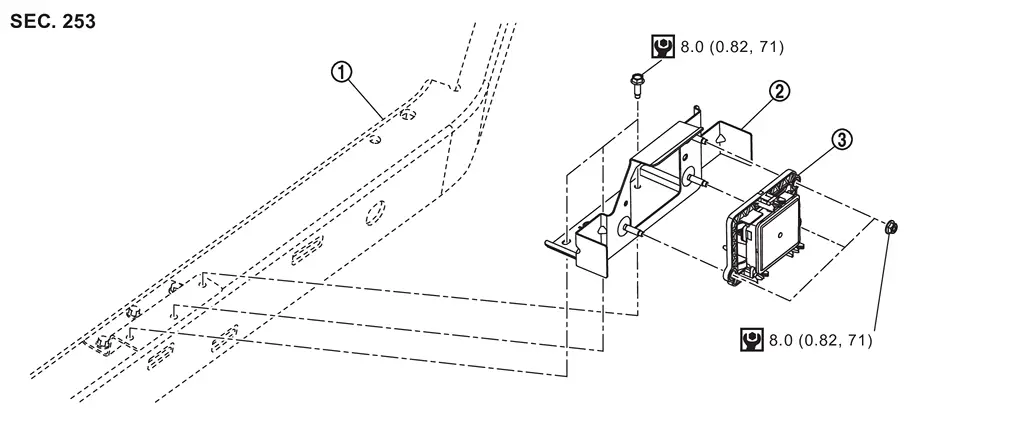
 |
Front bumper reinforcement |  |
Distance sensor bracket |  |
Distance sensor |
 |
: N·m (kg-m, in-lb) |
Removal and Installation
WARNING:
-
Jacking up or lift up the vehicle may the vehicle height to go down which cause a personal injury and/or damage to the air suspension component parts. Refer to Precaution for when Jacking and Lifting Up the vehicle with Electronic Air Suspension System.
REMOVAL
Remove front bumper fascia. Refer to Removal and Installation.
Disconnect the harness connector from the distance sensor.
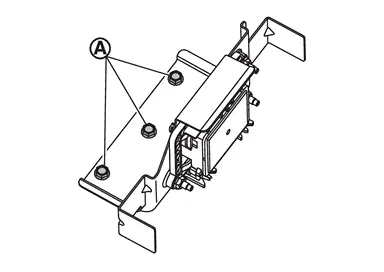
Mounting the distance sensor bracket Remove the bolts  and remove the distance sensor bracket from the front bumper reinforcement.
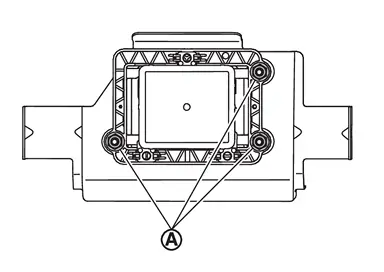
Remove the distance sensor mounting nuts and remove the distance sensor.
INSTALLATION
Installation is in the reverse order of removal.
CAUTION:
-
If remove the distnace sensor, perform "DISTANCE SENSOR ADJUSTMENT". Refer to Work Procedure.
-
If distance sensor is being replaced or has been disconnected, perform "ADDITIONAL SERVICE WHEN REPLACING DISTANCE SENSOR". Refer to Work Procedure. Refer to Work Procedure.
Other materials
System temporarily unavailable
In the Nissan Armada, if the Blind Spot Warning (BSW) system detects that the
radar sensors are obstructed, the system will automatically deactivate and display
the message "Unavailable Side Radar Obstruction" in the vehicle information display.
The Nissan Armada BSW system will remai ...
Steering System Service Data and Specifications
Steering Wheel
Item Standard
Steering wheel axial end play
0 mm (0 in)
Steering wheel play on the outer circumference
0 – 35 mm (0 – 1.38 in)
Steering wheel turning force
34 N (3.5 kgf, 7.6 lbf) or less
Steering Angle
WITHOUT DINAMIC DIGITAL SUSPENSION AND ELECTRONIC AIR SUSPE ...
High-Pressure Flexible Hose
Removal and Installation
REMOVALCAUTION:
Perform lubricant return operation before each refrigeration system disassembly. However, if a large amount of refrigerant or lubricant leak is detected, never perform lubricant return operation. Refer to Perform Lubricant Return Operation.
When disconnec ...