Work Procedure
If system detects that driver is not facing forward even though driver is facing forward, perform face recognition check.
PREPARATION BEFORE FACE RECOGNITION CHECK
Make sure that all of the following conditions are satisfied
-
vehicle speed is 0 km/h (stopped).
-
Shift position is "P" range.
-
Put driver's head on the headrest.
-
Adjust seat so that eye position is the same as the inner rear end of assist grip.
-
Adjust steering position to the lowest position and the farthest position from driver.
CAUTION:
-
It is necessary for another person to check the position of driver's eyes from the passenger side.
-
If the eye position is different from the specified position, face recognition cannot be performed correctly.
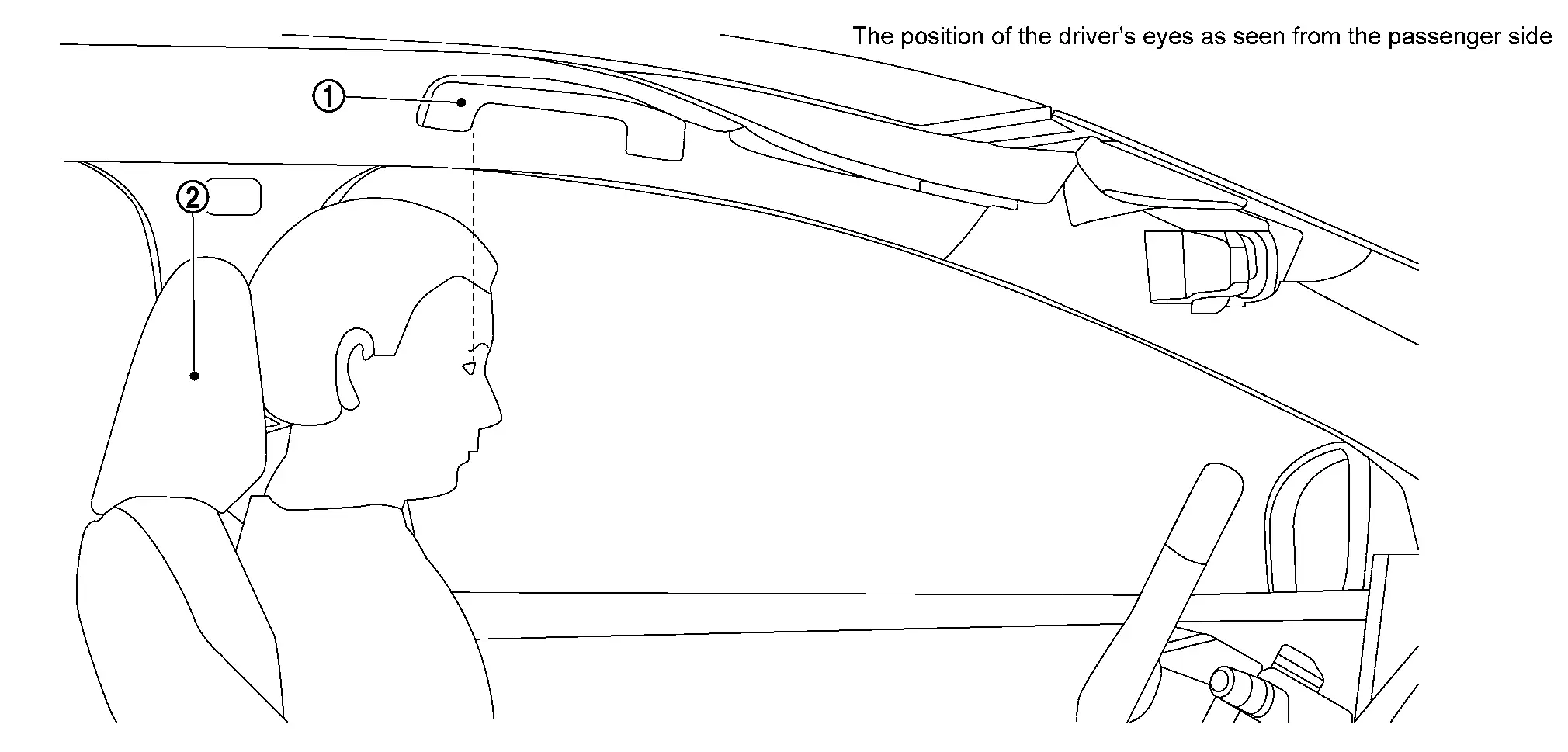
 |
Assist grip |  |
Head rest |
>>
GO TO 2.
PERFORM FACE RECOGNITION CHECK
With CONSULT
-
Ignition switch is ON.
-
Select "Work Support" in "Driver Monitor Camera".
-
Select “FACIAL RECOGNITION CHECK�.
-
Touch “Start�.
-
Check the note displayed on CONSULT and touch “Next�.
-
Follow CONSULT screen to check face recognition.
CAUTION:
-
Do not turn driver's face for 10 to 15 seconds approximately until the result is displayed.
-
Observe the following precautions while working.
-
Keep head on the headrest without moving seat position.
-
Do not wear sunglasses or masks.
-
Do not wear a hat or muffler that hides face.
-
Do not scratch face (do not hide eyes, nose, mouth).
-
Do not intentionally change facial expression (squinting, smiling, etc.).
-
Do not turn face any direction without instruction.
-
 NOTE:
NOTE:
-
Face recognition check is performed as following order;
Front of the vehicle
 → Right front pillar
 → Navigation screen
 → Front of the vehicle → Right door mirror
 → Left door mirror
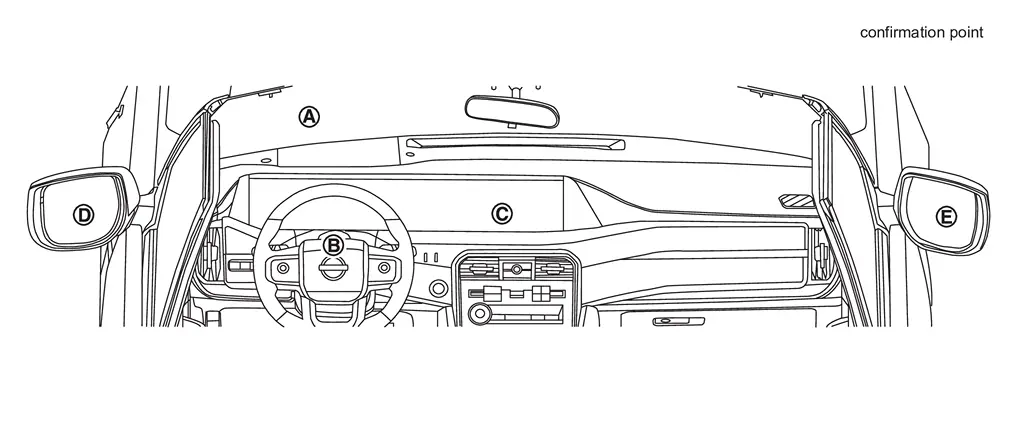
-
Perform twice only in front of the vehicle.
-
-
Confirm each check result.
NOTE:
-
When the result is "NG" and the precaution is surely followed, touch "Next."
-
When the result is "NG" and the precaution is not followed, touch "Retry."
-
>>
GO TO 3.
SAVE RESULT
With CONSULT
-
After completing all the work, touch "Screen Capture" to save the screen.
-
After saving the screen, touch "Save" to save the log information.
>>
WORK END
Other materials
Rear Height Sensor
Exploded View
Rear height sensor
:vehicle front
:N·m (kg-m, ft-lb)
:N·m (kg-m, in-lb)
Removal and Installation
REMOVALWARNING:
When removing the air suspension component parts, always follow the removing procedure since the vehicle heigh ...
Power Outlet. Usb Power Socket
Precautions
Precaution for Supplemental Restraint System (SRS) "AIR BAG" and "SEAT BELT PRE-TENSIONER"
The Supplemental Restraint System such as “AIR BAG� and “SEAT BELT PRE-TENSIONER�, used along with a front seat belt, helps to reduce the risk or severity of injury to the driver and front ...
Power Supply, Ground & Circuit Elements Tools and Preparation
Special Service Tools
Tool number
(TechMate No.)
Tool name Description
—
(—) Model GR8-1200 NI
Multitasking battery and electrical diagnostic station
Tests batteries, starting and charging systems and charges batteries.
For operating instructions, refer to diagnostic station instr ...