Removal and Installation
REMOVAL
Remove the back door finisher. Refer to Removal and Installation.
Remove the rear camera mounting screws  , then remove the rear camera
 .
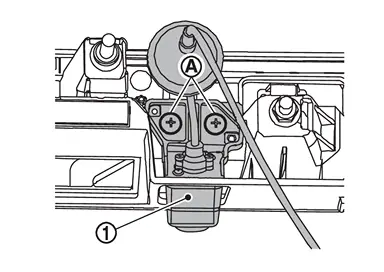
INSTALLATION
Install in the reverse order of removal.
Perform parameter writing. (With ProPILOT Assist 2.1) Refer to Work Procedure.
Perform camera image calibration. Refer to Work Procedure.
CAUTION:
Perform the calibration and perform the writing to the around view monitor control unit when removing and replacing each camera, removing the camera mounting parts (front grille, door mirror, etc.) and replacing the around view monitor control unit.
Other materials
Flexible seating
Basic information
The flexible seating system in the Nissan Armada is designed to deliver exceptional
versatility, allowing you to quickly adapt the interior layout for passengers or
cargo. Whether transporting people or maximizing storage space, the Nissan Armada
ensures both safety and conv ...
Automatic Emergency Braking (AEB) with Pedestrian Detection system
Basic information
WARNING
Improper use of the Nissan Armada AEB with Pedestrian Detection system may
result in serious injury or even fatal accidents.
The Nissan Armada AEB with Pedestrian Detection system is designed as
a supplemental safety aid and does not replace the driver’s respon ...
Additional Service When Replacing Chassis Control Module
Description
Vehicle specification needs to be written with CONSULT because it is not written after replacing the chassis control module. For details the operation, refer to “CONSULT Operation Manual�.
Work Procedure [After Replacing Chassis Control Module]
WRITING VEHICLE SPECIFICATION
With CONS ...