Basic information
In the Nissan Armada, the Hands On Detection system is an essential safety feature integrated within Steering Assist and ProPILOT Assist technologies. This system continuously monitors the driver’s interaction with the steering wheel through built-in sensors, ensuring that the driver remains actively engaged while driving.
When ProPILOT Assist is operating in Hands On (green) mode in the Nissan Armada, the system expects the driver to maintain contact with the steering wheel. If no steering input is detected or the driver removes their hands for a certain period, a warning message 1 appears and the hands-off warning indicator 2 illuminates. If no corrective action is taken, the system escalates alerts progressively to prompt driver intervention.
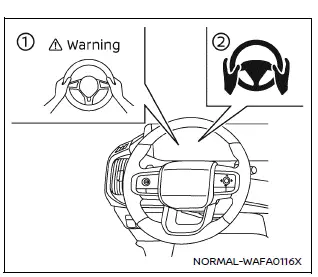
The Hands On Detection function in the Nissan Armada is also required for additional ProPILOT Assist 2.1 features. These include advanced systems such as Lane Change Assist and Passing Assist, especially when Easy Assist is active, ensuring the driver remains in control at all times.
NOTE:
The Nissan Armada Hands On Detection system may not accurately detect the driver’s hands under certain conditions:
- When gloves are worn.
- When a steering wheel cover is installed.
- When the driver grips non-detectable areas such as seams or spokes.
- If touch is not detected, applying slight steering torque can help confirm driver presence.
Warning and Emergency Stop
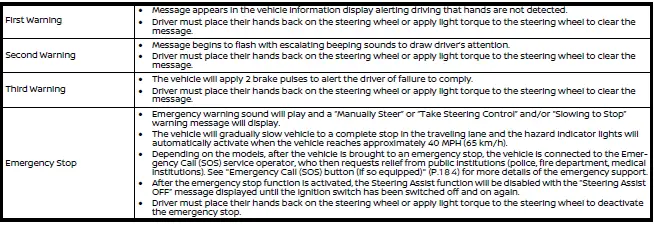
While operating in Hands On (green) mode, the Nissan Armada actively monitors steering input. If the driver fails to respond to escalating alerts, the system may initiate additional safety measures. It is always the driver’s responsibility to maintain proper control and keep hands on the steering wheel to avoid intervention.
Other materials
Hill descent control system
Basic information
WARNING
Do not rely solely on the Hill Descent Control system in the Nissan Armada
to regulate speed on steep downhill slopes. Always maintain full control of
the vehicle and use the brake pedal when necessary. Extra caution is required
on slippery, muddy, icy, or ext ...
Rear Final Drive Assembly
Exploded View
Final drive mounting bracket
Rear final drive assembly
Upper stopper
Lower stopper
Washer
: N·m (kg-m, ft-lb)
: Always replace after every disassembly.
Removal and Installation
WARNING:
Jacking up or lift up the vehicle may the vehicle height to g ...
Insufficient Cooling
Front Air Conditioner
Description
Symptom
Insufficient cooling
No cool air comes out. (Air flow volume is normal.)
Diagnosis Procedure
NOTE:
Perform self-diagnoses with CONSULT before performing symptom diagnosis. If any DTC is detected, perform the corresponding diagnosis.CHECK MAGNET CLUTCH ...