Basic information
WARNING
- If the Nissan Armada is equipped with tires of a different size than standard, the predictive course lines may become inaccurate.
- On slippery or snow-covered roads, the Nissan Armada predictive course lines may not correspond precisely to the actual path of the vehicle.
- If the battery has been disconnected or discharged, the Nissan Armada
system may display incorrect predictive lines. To recalibrate:
- Turn the steering wheel fully from lock to lock while the engine is running.
- Drive the Nissan Armada straight for at least 5 minutes.
- Turning the steering wheel while the ignition is ON but the vehicle is stationary may also cause inaccurate predictive lines.
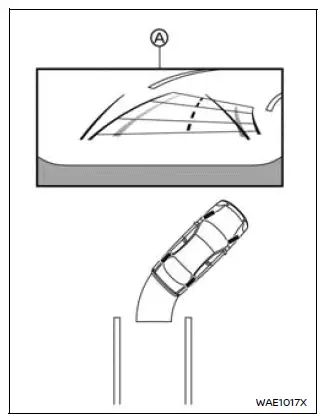
1. Before parking your Nissan Armada, visually inspect the parking space to ensure it is safe and clear of obstacles.
2. Shift the transmission into R (Reverse). The Nissan Armada rear camera view will automatically appear on the display A.
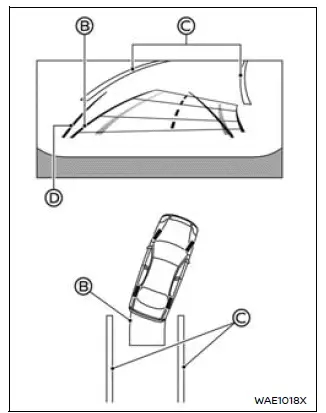
3. Slowly reverse the Nissan Armada while adjusting the steering wheel so that the predictive course lines B align with and enter the parking space C.
4. Continue steering to align the vehicle width guide lines D parallel with the parking space boundaries, ensuring accurate positioning.
5. Once the Nissan Armada is fully positioned within the parking space, shift into P (Park) and engage the parking brake.
Example
My Parking Locations
The Nissan Armada "My Parking Locations" feature allows drivers to store frequently used parking positions, ensuring sufficient space for door opening and easier parking alignment.
How to register the parking location:
After positioning your Nissan Armada correctly in the desired parking spot, follow these steps:
1. Press the "CAMERA/
 "
button.
"
button.
2. Tap
 to open the "Settings" menu.
3. Select the "My Parking Locations" option.
4. Choose your preferred slot from the list and tap "Register".
How to adjust the parking space frame:
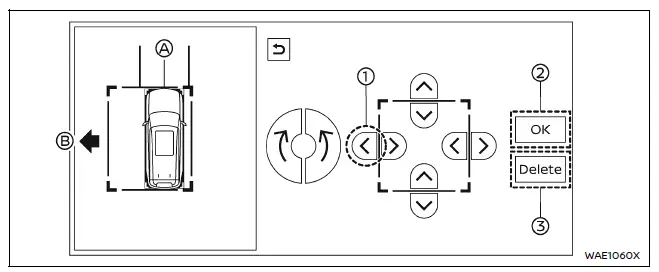
Use the on-screen arrow controls to modify the Nissan Armada parking frame A according to your space dimensions.
For instance, press key 1 to extend the frame toward direction B. Once satisfied, confirm the settings by pressing 2.
To delete a saved parking location, press 3.
After registration, the Nissan Armada system will automatically recognize the stored parking location and display guidance when approaching it in Reverse with the bird’s-eye view activated.
This intelligent Nissan Armada feature enhances everyday usability, making repeated parking scenarios faster, safer, and more precise.
Other materials
BSW system limitations
WARNING
The following limitations apply to the Nissan Armada Blind Spot Warning (BSW)
system. Ignoring these limitations or relying solely on the system may lead to serious
injury or even fatal accidents.
The Nissan Armada BSW system is not capable of detecting every vehicle
or object in ...
Transfer Assembly
Exploded View
Transfer assembly
: N·m (kg-m, ft-lb)
Removal and Installation
WARNING:
Jacking up or lift up the vehicle may the vehicle height to go down which cause a personal injury and/or damage to the air suspension component parts. Refer to Precaution for when Jacking and Li ...
Automatic Back Door Control Unit
Removal and Installation
REMOVALRemove luggage side lower finisher LH. Refer to Removal and Installation.
Disconnect automatic back door control unit harness connector.
Remove automatic back door control unit mounting nuts , and then remove automatic back door control unit .
INSTALLATIONInstall in ...