
Nissan Armada 2025-2026 Owner's Manual: How to enable/disable the BSW system
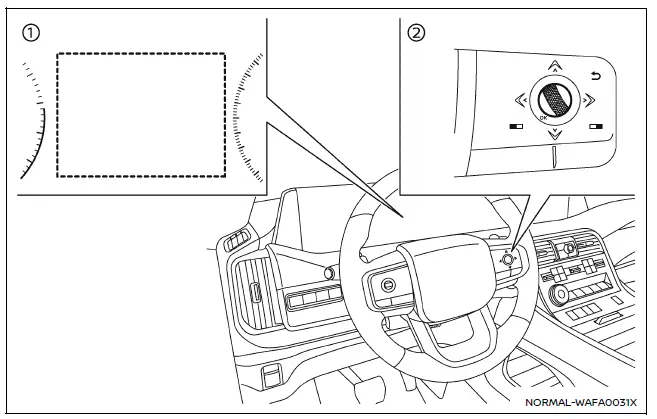
- Vehicle information display
- Steering-wheel-mounted controls (right side)
To configure the Nissan Armada BSW system, follow these steps:
1. Press the
 button until "Settings" appears in the vehicle information display, then confirm
using the scroll dial. Navigate to "Driver Assistance" and confirm.
button until "Settings" appears in the vehicle information display, then confirm
using the scroll dial. Navigate to "Driver Assistance" and confirm.
2. Select "Blind Spot Assist" and press the scroll dial.
3. Choose "Warning" and confirm to enable or disable the Nissan Armada BSW alerts.
4. To manage trailer-related functionality, select "Trailer Blind Spot" and confirm your preferred setting.
NOTE:
The Nissan Armada retains the selected BSW system settings even after the engine is turned off and restarted, ensuring consistent driver preferences across all journeys.
The Nissan Armada Blind Spot Warning system provides an additional layer of safety by monitoring areas that are difficult to see, helping drivers make more informed lane-change decisions while maintaining full control and responsibility for the vehicle.
 BSW system operation
Side indicator light
BSW indicator (vehicle information display)
Vehicle information display
Steering-wheel-mounted controls (right side)
The Nissan Armada BSW system becomes active at ...
 BSW system limitations
WARNING
The following limitations apply to the Nissan Armada Blind Spot Warning (BSW)
system. Ignoring these limitations or relying solely on the system may lead to serious
injury or even fatal a ...
Other materials:
File menu
The file menu in the Nissan Armada driving recorder system allows users to conveniently
manage all recorded content, including photos and video files. Through this interface,
you can view, organize, and delete stored media directly from the touchscreen display,
making it easy to maintain stora ...
Hill descent control system
Basic information
WARNING
Do not rely solely on the Hill Descent Control system in the Nissan Armada
to regulate speed on steep downhill slopes. Always maintain full control of
the vehicle and use the brake pedal when necessary. Extra caution is required
on slippery, muddy, icy, or ext ...
Maximum Gross Vehicle Weight (GVW)/maximum Gross Axle Weight (GAW)
The total Gross Vehicle Weight (GVW) of your Nissan Armada must never exceed
the Gross Vehicle Weight Rating (GVWR) indicated on the F.M.V.S.S./C.M.V.S.S. certification
label.
GVW represents the combined weight of the Nissan Armada, including passengers,
cargo, luggage, hitch equipment, t ...

0.0042