
Nissan Armada 2025-2026 Owner's Manual: How to enable/disable the RCTA system
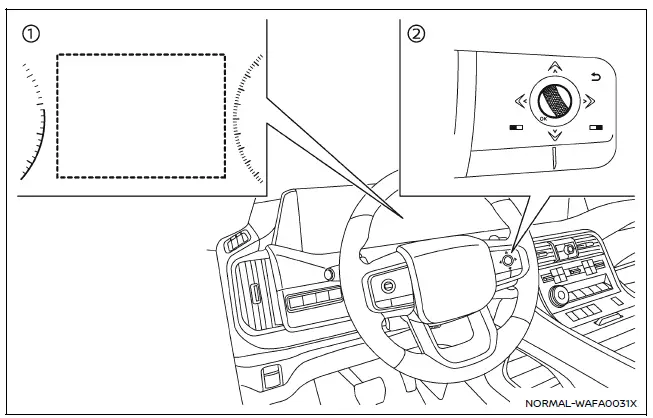
- Vehicle information display
- Steering-wheel-mounted controls (right side)
Follow these steps to activate or deactivate the Nissan Armada RCTA system:
1. Press the
 button until the "Settings" menu appears in the vehicle information display, then
confirm using the scroll dial.
button until the "Settings" menu appears in the vehicle information display, then
confirm using the scroll dial.
Select "Driver Assistance" using the scroll dial, and press to confirm.
2. Navigate to "Parking Assist", then select "Rear Cross Traffic Alert", and confirm your selection.
3. Use the scroll dial to turn the Nissan Armada RCTA system ON or OFF as desired.
NOTE:
The Nissan Armada will retain the selected RCTA settings even after the engine is restarted, ensuring consistent operation.
RCTA system limitations
WARNING
The following limitations apply to the Nissan Armada RCTA system. Failure to recognize these limitations may result in serious injury or fatal accidents.
- Always visually confirm the area behind and around your Nissan Armada
before reversing. The radar sensors detect moving vehicles only and cannot identify
all obstacles such as:
- Pedestrians, cyclists, animals, or small objects
- Vehicles traveling faster than approximately 19 MPH (30 km/h)
- Vehicles moving slower than approximately 5 MPH (8 km/h)
- The Nissan Armada radar sensors may fail to detect vehicles in certain
conditions, including:
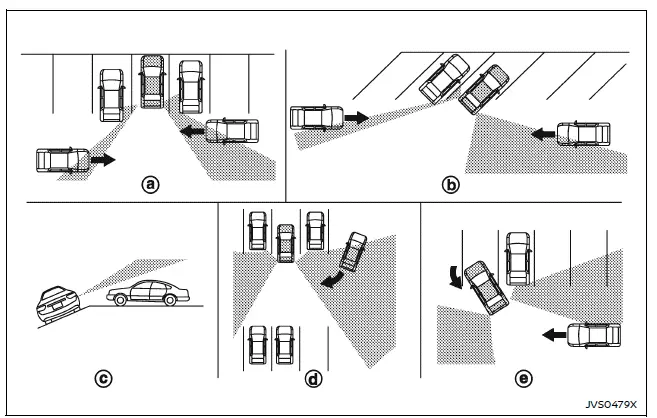
- When nearby parked vehicles block radar signals (Illustration a)
- When parked at an angle (Illustration b)
- When parked on a slope or uneven terrain (Illustration c)
- When an approaching vehicle turns into the lane behind you (Illustration d)
- When the angle between your Nissan Armada and the approaching vehicle is minimal (Illustration e)
- Detection capability may be reduced in adverse conditions such as:
- Heavy rain, snow, or fog
- Water spray from the road
- Accumulation of ice, frost, or dirt on the vehicle
- Avoid placing stickers, transparent films, accessories, or additional
paint near the radar sensors on your Nissan Armada.
Such modifications may interfere with proper detection and system performance.
- High noise levels (such as loud audio systems or open windows) may prevent the driver from hearing the warning chime.
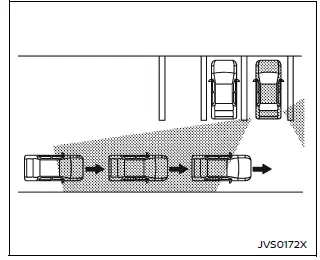
Illustration 1
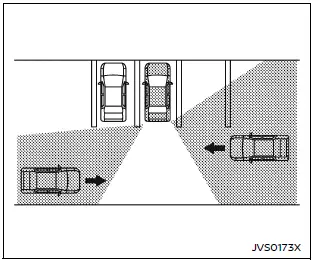
Illustration 2
NOTE:
In scenarios where multiple vehicles approach in sequence (Illustration 1) or from opposing directions (Illustration 2), the Nissan Armada RCTA system may not emit additional warning chimes after the first detected vehicle passes the sensors.
The Nissan Armada RCTA system significantly enhances reversing safety, but it should always be used as a support system in combination with careful driver attention and awareness. :contentReference[oaicite:0]{index=0}
 RCTA system operation
Side indicator light
Vehicle information display
Steering-wheel-mounted controls (right side)
The Nissan Armada RCTA system enhances driver awareness by monitoring cross traffic
when r ...
 System temporarily unavailable
When the Nissan Armada detects that the radar sensors are obstructed, the system
will automatically deactivate to ensure safe and reliable operation.
A warning message reading "Unavailable Sid ...
Other materials:
Passenger compartment
Example
The interior of the Nissan Armada is designed for comfort, technology, and convenience.
This section outlines key controls, storage areas, and comfort features that enhance
the driving and passenger experience in the Nissan Armada.
Inside mirror
Overhead console
Map lights
...
Garage mode system
The Nissan Armada liftgate height can be customized to suit specific environments,
such as garages with limited clearance.
1. Open the Nissan Armada liftgate fully.
2. Manually adjust the liftgate to the desired height and hold it in position.
3. Press and hold the liftgate close and lock switc ...
Fuses
Engine compartment
Basic information
WARNING
Never install a fuse in your Nissan Armada with an amperage rating different
from the specified value shown on the fuse box cover. Using an incorrect fuse can
lead to serious electrical damage, malfunction of control modules, or even fire
haz ...

0.0033