Removal and Installation
-
Release the lock knob at the back of the Intelligent Key and remove the mechanical key.
-
Insert remover tool (A) wrapped with a cloth into the slit 1 of the corner and twist 2 it to separate the upper part from the lower part.
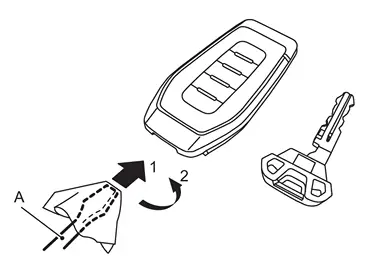
CAUTION:
-
Never touch the circuit board or battery terminal.
-
The Intelligent Key is water-resistant. However, if it does get wet, immediately wipe it dry.
-
-
Replace the battery with new one.
Battery replacement :Coin-type lithium battery (CR2032) -
Upper and lower parts fixing pawls, and then push them together until it is securely closed.
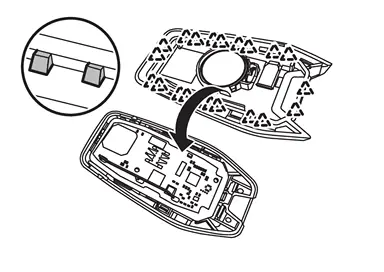

: Pawl CAUTION:
-
When replacing battery, keep dirt, grease, and other foreign materials off the electrode contact area.
-
After replacing the battery, check that all Intelligent Key functions work normally.
-
Other materials
Engine compartment check locations
Window washer fluid reservoir
Fuse/fusible link holder
Engine oil filler cap
Engine oil dipstick
Brake fluid reservoir
Battery
Engine coolant reservoir
Radiator filler cap
Drive belts
Air cleaner
VR35DDTT engine
NOTE:
Depending on the configuration of your Nissan Arma ...
Adjustment of Brake Caliper Initial Position
Description
CAUTION:
When performing the following operations, always use CONSULT (It cannot be performed by any means other than CONSULT.), for performing "Initialization position adjustment" of "Work support". Refer to Work Procedure.×: Required —: not required Procedure Initialization positio ...
Rear Door Check Link
Removal and Installation
REMOVALFully close rear door glass.
Remove rear door woofer. Refer to Removal & Installation.
Remove rear door check link mounting bolt of vehicle body side.
Remove rear door check link mounting bolts of rear door panel, and then take rear door check link out from the ho ...