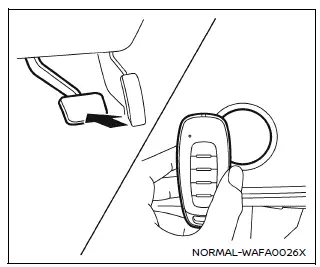
If the Intelligent Key battery in your Nissan Armada becomes discharged, or if external conditions such as interference affect its operation, the engine can still be started using an alternative method. This ensures continued usability of the Nissan Armada even in low-battery situations.
Follow the procedure below to start the Nissan Armada engine:
1. Press the park button to shift the transmission into the P (Park) position.
2. Firmly depress the brake pedal.
3. Touch the ignition switch with the Intelligent Key as shown in the illustration. A confirmation chime will sound.
4. Within 10 seconds after the chime, press the ignition switch while holding the brake pedal. The Nissan Armada engine will start.
After completing step 3, pressing the ignition switch without pressing the brake pedal will switch the system to the ON position.
NOTE:
- When starting the Nissan Armada using this method or switching the ignition
to ON, a "Key Battery Low" warning may appear on the display even if the Intelligent
Key is inside the vehicle. This is normal and not a system malfunction.
To clear the message, touch the ignition switch again with the Intelligent Key.
- If the "Key Battery Low" warning appears, replace the Intelligent Key battery in your Nissan Armada as soon as possible to ensure reliable operation.
Before starting the engine
- Ensure the area around your Nissan Armada is clear of obstacles, people, or hazards.
- Check fluid levels such as engine oil, coolant, brake fluid, and windshield washer fluid regularly or at each refueling.
- Confirm that all windows, mirrors, and lighting elements are clean and unobstructed.
- Inspect tires visually and verify that tire pressure is within the recommended range for your Nissan Armada.
- Make sure all doors are securely closed and locked.
- Adjust the driver’s seat, steering position, and head restraints for optimal comfort and safety.
- Set both interior and exterior mirrors properly for maximum visibility.
- Fasten your seat belt and ensure all passengers in the Nissan Armada do the same.
- Check that all warning lights operate correctly when the ignition is turned ON.
Other materials
Avoiding collision and rollover
WARNING
Improper or unsafe operation of the Nissan Armada may lead to loss of control,
serious accidents, or vehicle rollover. Always drive responsibly and remain fully
aware of road conditions and surroundings.
Stay alert at all times and practice defensive driving techniques when operating
...
Refrigeration System Symptoms
Trouble Diagnosis For Unusual Pressure
Diagnose using a manifold gauge whenever system’s high and/or low side pressure(s) is/are unusual. The marker above the gauge scale in the following tables indicates the standard (usual) pressure range. Refer to above table (Ambient air temperature-to-operati ...
Additional Service When Replacing Distance Sensor
Work Procedure
Always perform the distance sensor configuration after replacing the distance sensor.
Always perform the radar alignment after removing and installing or replacing the distance sensor.
CAUTION:
The system does not operate normally unless the distance sensor configuration and the r ...