Example
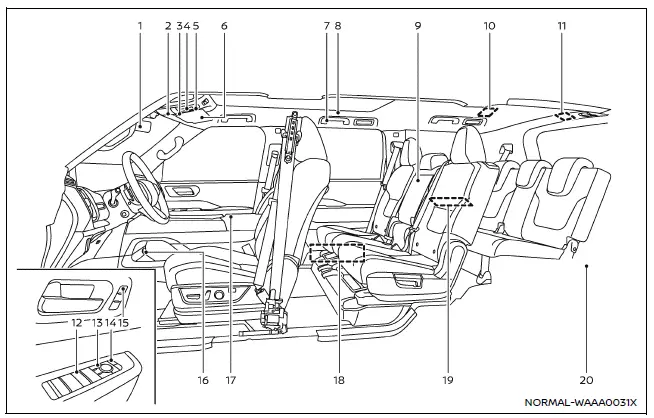
The interior of the Nissan Armada is designed for comfort, technology, and convenience. This section outlines key controls, storage areas, and comfort features that enhance the driving and passenger experience in the Nissan Armada.
- Inside mirror
- Overhead console
- Map lights
- HomeLink Universal Transceiver*
- Microphone**
- Moonroof switch*
- Emergency Call (SOS) button*
- Sun visors
- Assist grips
Coat hooks - Rear personal lights
- Armrest (2nd row seat)*
Cup holders (2nd row seat) - Rear room light
- Cargo light
- Power window switch
- Outside mirror control switch (driver's side)
- Power door lock switches
- Memory seat switches*
- Lower console tray
- Power outlet
- Console box
- Power outlet
- USB charging connector
- Heated seat switches (2nd row seats)*
- Rear air conditioner control switches
- USB charging connector*
- Cup holders (3rd row seat)
USB charging connector* - Cargo area
- Power outlet*
- Cargo floor box
- Luggage hooks
- Jacking tools
*: if so equipped
**: Refer to the separate NissanConnect Owner's Manual.
Other materials
Rear Final Drive: R240 (dl) Tools and Preparation
Preparation
Special Service Tools
The actual shapes of the TechMate tools may differ from those of the special service tools illustrated here.
Tool number
(TechMate No.)
Tool name Description
KV10122000
(NI-53383)
Side oil seal puller
Removing side oil seal
KV10123000
(NI-53384)
Side oil ...
Noise, Vibration and Harshness (nvh) Troubleshooting
NVH Troubleshooting Chart
Use chart below you find the cause of the symptom. If necessary, repair or replace these parts. Possible cause and SUSPECTED PARTS Symptom Reference
DRIVE SHAFT REAR AXLE
Noise Shake Noise Shake Vibration Shimmy Judder Poor quality ride or
Excessive joint an ...
Diagnosis and Repair Work Flow
Work Flow
OVERALL SEQUENCEDETAILED FLOWGET INFORMATION FOR SYMPTOM
Get detailed information from the customer about the symptom (the condition and the environment when the incident/malfunction occurs).
Check operation condition of the function that is malfunctioning.
>>
GO TO 2.
CHECK ...