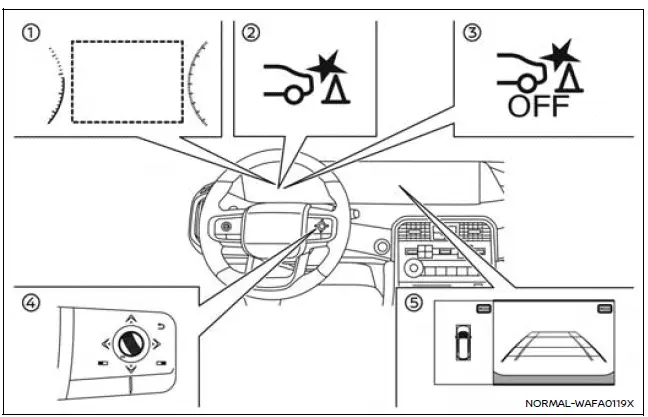
- Vehicle information display
- RAB system warning indicator (vehicle information display)
- RAB system OFF warning light (instrument panel)
- Steering-wheel-mounted controls (right side)
- Touch screen display
The Nissan Armada RAB system becomes active when the transmission is shifted into the R (Reverse) position and the vehicle is moving at speeds below approximately 9 MPH (15 km/h), ensuring reliable operation during parking or low-speed reversing.
If the Nissan Armada detects a potential collision risk with an object while reversing, the system will issue multiple alerts. The RAB warning indicator will flash in the vehicle information display, a red frame will appear on the touch screen (for models equipped with the Intelligent Around View Monitor), and an audible warning will sound three times. If the driver does not react promptly, the system will automatically apply the brakes.
After automatic braking is activated, the driver must press and hold the brake pedal to maintain braking force and ensure the vehicle remains stationary.
NOTE:
- The Nissan Armada brake lights will illuminate automatically when the RAB system applies the brakes.
- A noise may be heard during automatic braking. This is a normal operating characteristic and does not indicate a malfunction.
How to temporarily cancel the RAB system
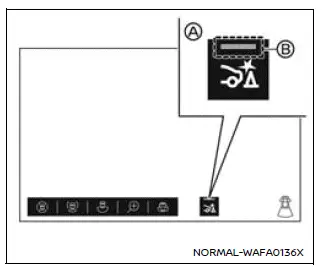
Example
The Nissan Armada RAB system can be temporarily enabled or disabled by selecting the RAB ON/OFF control (A) on the touch screen display. When the system is active, the indicator (B) will illuminate, confirming that the feature is operational.
However, when TOW mode is activated (if equipped) or when the trailer Blind Spot Warning (BSW) function is enabled, the Nissan Armada RAB system cannot be turned on, as system priorities shift to towing-related safety functions.
NOTE:
- The indicator (B) will turn off and a message will be displayed only when the Nissan Armada driver manually disables the RAB system. If the system is automatically disabled due to a malfunction or because the Vehicle Dynamic Control (VDC) system is turned off, the indicator may remain on without displaying a warning message.
- The Nissan Armada RAB system is automatically disabled when TOW mode is selected or when the trailer BSW function is active.
- The Nissan Armada RAB system will automatically reactivate after the engine is restarted, provided that the trailer BSW function is not active.
Other materials
Basic information
The Nissan Armada is equipped with an advanced automatic brake hold function
designed to enhance driving convenience in stop-and-go traffic conditions. This
system automatically maintains braking force when the vehicle comes to a complete
stop, such as at traffic lights or intersections, allow ...
Cooler Pipe and Hose
Exploded View
FRONT
Front heater & cooling unit assembly
O-ring
High-pressure pipe
Valve cap (high-pressure side)
Tube clip 1
Washer seal
Condenser & liquid tank assembly
High-pressure flexible hose
Low-pressure flexible hose
Valve cap (low-pressure side)
L ...
Seat Cushion Blower Motor
Removal and Installation
REMOVALRemove front seat cushion trim and pad. Refer to Disassembly and Assembly.
Disengage fixing pawls and then remove front seat cushion blower motor.
: Pawl
Disengage front seat cushion blower motor harness fixing clip.
Disconnect front seat cushion blower motor con ...