WARNING
The following limitations apply to the Rear Automatic Braking (RAB) system in the Nissan Armada. Failure to fully understand and follow these limitations may result in serious injury or even fatal accidents.
- When the Nissan Armada approaches an obstacle while the accelerator or
brake pedal is already being pressed, the RAB system may not activate, or its
response may be delayed. System performance can vary depending on vehicle condition,
driving behavior, traffic situations, weather, and road surface conditions.
Do not rely on the system to respond in time.
The driver must always be prepared to apply the brake pedal immediately when necessary.
- If it is necessary to override the Nissan Armada RAB system, firmly press the accelerator pedal to cancel automatic braking.
- Always check your surroundings carefully and physically turn to look
behind the Nissan Armada before and while reversing.
The RAB system is designed to detect primarily stationary objects behind the vehicle and may not recognize the following:
- Moving objects
- Low-height obstacles
- Narrow or thin objects
- Wedge-shaped or irregular objects
- Complex or unevenly shaped objects
- Multiple closely spaced objects
- Objects very close to the bumper (less than approximately 1 ft [30 cm])
- Objects that suddenly appear in the detection area
- Thin materials such as ropes, wires, or chains
- The Nissan Armada RAB system may not reliably detect pedestrians or animals, especially in dynamic or unpredictable situations.
- The system may also fail to operate properly when encountering:
- Objects positioned high above the ground
- Objects located off-center relative to the vehicle path
- Soft materials such as snow, foam, or fabric that absorb sonar signals
- The Nissan Armada RAB system may not function correctly under the following
conditions:
- When the sonar sensors are covered by rain, snow, ice, dirt, or debris
- When strong ambient noise is present around the vehicle
- When the surface of the detected object is angled relative to the vehicle
- When the sensor area is exposed to extreme heat or cold
- The Nissan Armada RAB system may unintentionally activate in certain
environments, including:
- Areas with tall grass or vegetation
- Close proximity to walls, toll booths, narrow tunnels, or parking barriers
- Road surfaces with bumps, protrusions, or manhole covers
- Driving through hanging objects such as flags or curtains
- Approaching high curbs or parking stops
- Driving on steep inclines or declines
- Snow or ice accumulation behind the vehicle
- Nearby ultrasonic sources, such as sensors from other vehicles
- Once automatic braking has been activated in the Nissan Armada, it will not activate again for the same obstacle during that maneuver.
- The automatic braking function operates only for a limited duration. The driver must apply and maintain brake pressure manually to keep the vehicle stopped.
- The Nissan Armada RAB system may not perform properly in the following
situations:
- Driving in adverse weather conditions such as rain, fog, or snow
- Driving on steep slopes
- Changes in vehicle posture, such as when driving over bumps
- Driving on slippery or low-traction surfaces
- Sharp steering inputs or full steering lock maneuvers
- Use of snow chains
- Installation of non-recommended wheels or tires
- Reduced braking performance due to cold brakes or immediately after starting the vehicle
- Reduced braking efficiency caused by wet brakes after driving through water or washing the vehicle
- To prevent unintended activation of the Nissan Armada RAB system, it
should be turned OFF in the following situations:
- When the vehicle is being towed
- When transported on a flatbed truck
- When placed on a chassis dynamometer
- When driving on highly uneven surfaces
- When towing another object
- When non-standard suspension components are installed (changes in ride height or body angle may affect detection accuracy)
- When accessories such as bike racks or cargo carriers obstruct the rear sensors
- When towing a trailer or another vehicle, always disable the Nissan Armada RAB system to avoid unexpected braking that could lead to dangerous situations.
- When TOW mode is activated (if equipped), the Nissan Armada RAB system is automatically disabled.
- When the trailer Blind Spot Warning (BSW) function is active, the RAB system is also automatically disabled, and the message "Driving Aids Limited Towing Assist Activated" will be displayed.
- Excessive noise, such as loud audio or open windows, may interfere with warning chimes, making them difficult to hear.
System temporarily unavailable
Condition A:
When the Vehicle Dynamic Control (VDC) system in the Nissan Armada is switched OFF, the Rear Automatic Braking (RAB) system is automatically disabled to ensure proper system coordination. In this situation, the RAB system OFF warning light will illuminate on the instrument panel, indicating that the feature is not currently active.
Action to take:
Once the VDC system is turned back ON, the Nissan Armada RAB system will automatically resume normal operation without requiring any additional input from the driver.
Condition B:
When TOW mode is selected (if equipped) or when the trailer Blind Spot Warning (BSW) function is activated, the Nissan Armada will temporarily disable the RAB system. In this case, the message "Rear Driving Aids Unavailable Towing Assist Activated" will appear in the vehicle information display, and the RAB system OFF warning light will illuminate.
This behavior ensures that the Nissan Armada prioritizes towing-related safety systems and prevents unintended braking during trailer operation.
Action to take:
When TOW mode is deselected or the trailer BSW function is deactivated, the Nissan Armada RAB system will automatically become available again and resume its normal protective function.
System malfunction
Basic information
If the Nissan Armada RAB system detects a malfunction, it will automatically shut down to prevent unreliable operation. In such cases, an audible alert will sound, the RAB system OFF warning light will illuminate, and the message "Malfunction See Owner's Manual" will be displayed in the vehicle information screen.
This safety response is designed to ensure that the driver is aware that the Nissan Armada rear braking assistance feature is no longer functioning correctly.
Action to take
If the warning light appears, safely park the Nissan Armada in a secure location, switch off the engine, and then restart it. If the warning indicator remains illuminated after restarting, the system requires professional inspection. It is strongly recommended to have the Nissan Armada checked by an authorized NISSAN dealer to restore full system functionality.
NOTE:
If the Nissan Armada RAB system is temporarily unavailable due to environmental or operating conditions, the RAB system OFF warning light may blink to indicate a temporary status rather than a permanent fault.
System maintenance
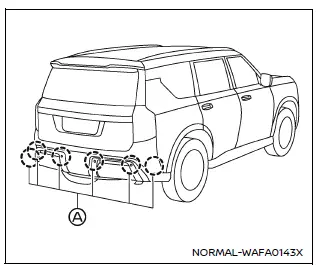
Example
The Nissan Armada is equipped with sonar sensors (A) located in the rear bumper, which are essential for proper operation of the RAB system. These sensors continuously monitor the area behind the vehicle and must be kept in optimal condition to ensure accurate detection.
To maintain reliable performance of the Nissan Armada RAB system, carefully follow these maintenance recommendations:
- Always keep the sonar sensors clean and free from dirt, snow, ice, or debris to ensure accurate detection.
- If the sensors become dirty, gently clean them using a soft cloth, taking care not to scratch or damage the surface.
- Temporary environmental conditions such as splashing water, fog, or mist may obstruct the sensors. Similarly, ice, frost, or dirt buildup can interfere with detection. Regularly inspect and clear the sensor area.
- Avoid exposing the sonar sensors and surrounding areas to strong impacts. Do not attempt to remove or disassemble the sensors. If the Nissan Armada has been involved in a collision or the sensor area appears damaged, have the system inspected by a qualified technician at a NISSAN dealership.
- Do not apply stickers (including transparent films), install accessories, or repaint the area around the sensors, as this may interfere with proper system operation.
- When washing the Nissan Armada with a high-pressure washer, avoid directing strong water jets directly at the sonar sensors, as excessive pressure may cause malfunction or damage.
Other materials
Flat towing your vehicle
Flat towing
Flat towing—also referred to as dinghy towing or “4-down� towing—means towing
your Nissan Armada with all four wheels in contact with the ground.
This method is commonly used when a vehicle is towed behind a motorhome or recreational
vehicle. However, it is critical to unde ...
Multi-Way Control Valve
Exploded View
Multi-way control valve
O-ring
Water outlet
Engine coolant temperature sensor 1
Gasket
To oil cooler hose 1. Refer to Exploded View.
To electric water pump. Refer to Exploded View.
To radiator. Refer to RADIATOR : Exploded View.
To electric th ...
Brake Fluid
Inspection
WARNING:
Jacking up or lift up the vehicle may the vehicle height to go down which cause a personal injury and/or damage to the air suspension component parts. Refer to Precaution for when Jacking and Lifting Up the vehicle with Electronic Air Suspension System.
BRAKE FLUID LEVEL
C ...