
Nissan Armada 2025-2026 Service and Repair Manual: Removal and Installation
WARNING:
REMOVAL
Shift transmission to the neutral position, and then release parking brake.
Remove engine under cover. Refer to Exploded View.
Put matching marks  on propeller shaft flange yoke and transfer companion flange.
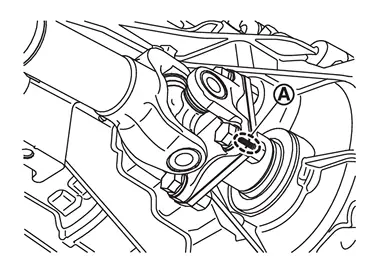
CAUTION:
For matching mark, use paint. Never damage propeller shaft flange yoke and transfer companion flange.
Put matching marks on propeller shaft flange yoke and final drive companion flange.
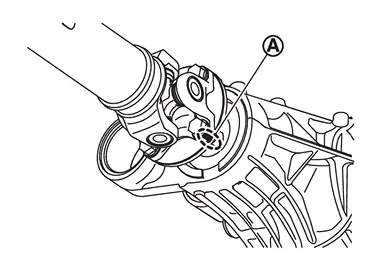
CAUTION:
For matching mark, use paint. Never damage propeller shaft flange yoke and final drive companion flange.
Remove propeller shaft assembly fixing bolts and nuts, and separate propeller shaft assembly from transfer companion flange and final drive companion flange.
Remove propeller shaft assembly.
Remove heat shield plate.
Perform inspection after removal. Refer to Inspection.
INSTALLATION
Note the following, and install in the reverse order of removal.
For non-reusable parts, refer to Exploded View.
For each tightening torque, refer to Exploded View.
Align matching marks
to install propeller shaft flange yoke and final drive companion flange.Align matching marks
to install propeller shaft flange yoke and transfer companion flange.If propeller shaft or final drive has been replaced, connect them as follows:
Install propeller shaft
 while aligning matching mark of propeller shaft with matching mark
  of final drive
  on the joint as close as possible.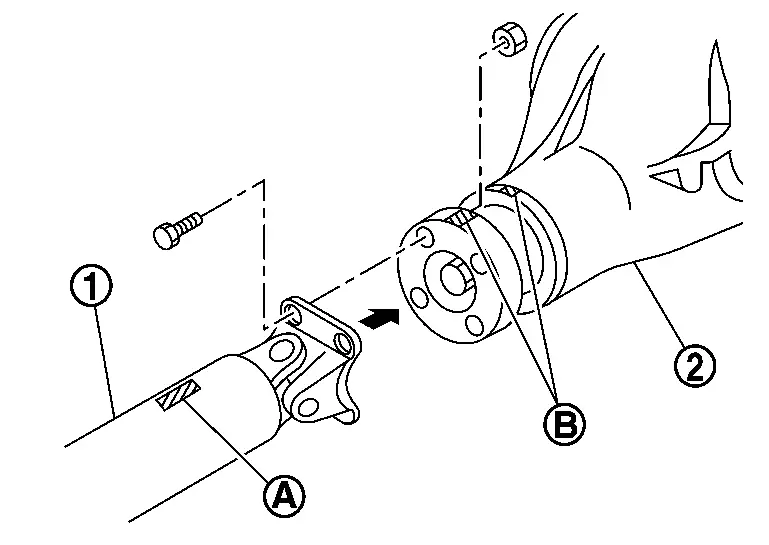
 NOTE:
NOTE:Matching mark
is has been painted in either position.
Perform inspection after installation. Refer to Inspection.
 Exploded View
REMOVAL
Propeller shaft assembly : Vehicle front : N·m (kg-m, ft-lb) : Always replace after every disassembly.
DISASSEMBLY
Snap ring Journal bearing Journal Flange yoke Propeller shaft tube ...
 Disassembly and Assembly
DISASSEMBLY
Put a matching mark between propeller shaft and flange yoke and remove snap rings .
CAUTION:
For matching mark, use paint. Never damage the surface.
Lightly tap bottom of yoke using a c ...
Other materials:
Exploded View
Front door outside handle Escutcheon cover Escutcheon base Rear gasket Front door outside handle bracket TORX bolt Key rod
(Driver side) TORX bolt Front door lock assembly Inside handle cap Front door inside handle Hole seal TORX bolt Front gasket : Clip : Pawl : Always replace afte ...
Informational icons
The Nissan Armada driving recorder system uses a set of informational icons to
clearly indicate its current operating status. These icons are displayed on the
driving recorder screen and provide real-time feedback, allowing the driver to quickly
understand system conditions without navigating ...
How to enable/disable the sonar system
Vehicle information display
Steering-wheel-mounted control (right side)
The Nissan Armada sonar system is automatically activated when the ignition is
in the ON position and the transmission is placed in D (Drive) or R (Reverse), ensuring
immediate assistance during low-speed maneu ...

0.0093