
Nissan Armada 2025-2026 Owner's Manual: Informational icons
The Nissan Armada driving recorder system uses a set of informational icons to clearly indicate its current operating status. These icons are displayed on the driving recorder screen and provide real-time feedback, allowing the driver to quickly understand system conditions without navigating through menus. This intuitive visual system enhances usability and ensures that the Nissan Armada driver remains informed at all times.
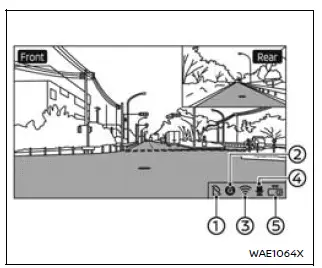
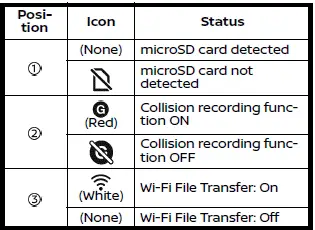
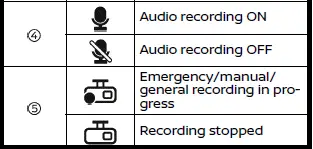
NOTE:
- If no icon appears in position 1 on the Nissan Armada display and recorded images or videos are not being saved, this may indicate that the microSD card does not have enough available storage space. In this case, it is recommended to delete unnecessary files to free up space.
- If
 is displayed, the microSD card in your Nissan Armada may be malfunctioning.
If formatting the card does not resolve the issue, replace it with a compatible
new microSD card.
is displayed, the microSD card in your Nissan Armada may be malfunctioning.
If formatting the card does not resolve the issue, replace it with a compatible
new microSD card. - If
 ,
,
 (gray), or
 (gray) is displayed, there may be a malfunction in the Nissan Armada vehicle
system or the driving recorder itself.
(gray) is displayed, there may be a malfunction in the Nissan Armada vehicle
system or the driving recorder itself.
In such cases, it is strongly recommended to have your Nissan Armada inspected by an authorized Nissan dealer to ensure proper system functionality and safety.
 Driving recorder system interface
Touch "
"
on the Launch Bar to access the applications menu.
Select the "Dash Cam" key to open the Nissan Armada driving recorder interface.
The "Dash Cam" shortcut ...
 File menu
The file menu in the Nissan Armada driving recorder system allows users to conveniently
manage all recorded content, including photos and video files. Through this interface,
you can view, organiz ...
Other materials:
Passenger compartment
Example
The interior of the Nissan Armada is designed for comfort, technology, and convenience.
This section outlines key controls, storage areas, and comfort features that enhance
the driving and passenger experience in the Nissan Armada.
Inside mirror
Overhead console
Map lights
...
Basic information
The Nissan Armada is equipped with an advanced automatic brake hold function
designed to enhance driving convenience in stop-and-go traffic conditions. This
system automatically maintains braking force when the vehicle comes to a complete
stop, such as at traffic lights or intersections, allow ...
LDW system operation
The Nissan Armada LDW and I-LI systems utilize a forward-facing camera mounted
behind the windshield to continuously monitor lane markings and road boundaries.
Example
I-LI ON indicator (displayed in the vehicle information screen)
LDW/I-LI alert indicator (vehicle information displ ...

0.0039