
Nissan Armada 2025-2026 Owner's Manual: How to enable/disable the sonar system
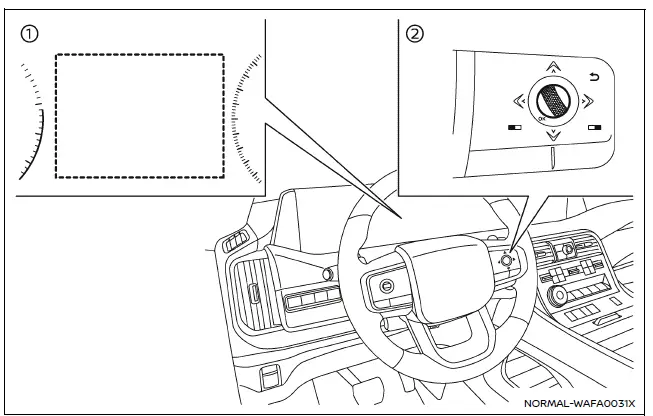
- Vehicle information display
- Steering-wheel-mounted control (right side)
The Nissan Armada sonar system is automatically activated when the ignition is in the ON position and the transmission is placed in D (Drive) or R (Reverse), ensuring immediate assistance during low-speed maneuvers.
To customize the sonar system settings in the Nissan Armada, follow these steps carefully:
1. Press the
 button until "Settings" appears in the vehicle information display, then press the
scroll dial. Use the scroll dial to navigate to "Driver Assistance" and confirm
your selection.
button until "Settings" appears in the vehicle information display, then press the
scroll dial. Use the scroll dial to navigate to "Driver Assistance" and confirm
your selection.
2. Select "Parking Assist" and press the scroll dial to access sonar-related settings.
3. Navigate through the menu using the scroll dial to configure the following Nissan Armada features:
- Rear Cross Traffic Alert
- Enables or disables the Rear Cross Traffic Alert system for safer reversing.
- Moving Object (if so equipped)
- Turns ON/OFF the Moving Object Detection (MOD) system for enhanced awareness.
- Front Sonar
- Activates or deactivates the front sonar sensors in the Nissan Armada.
- Rear Sonar
- Activates or deactivates the rear sonar sensors.
- Sonar Distance
- Adjusts detection sensitivity to "Long," "Medium," or "Short" depending on driving preferences.
- Auto Show Sonar
- Displays the sonar view automatically in the Nissan Armada information display when sensors detect nearby objects.
- Sonar Volume
- Adjusts the alert tone volume to "High," "Medium," or "Low" for optimal audibility.
 System operation
The Nissan Armada sonar system provides both visual and audible alerts under
the following conditions:
Detection of front obstacles when the transmission is in D (Drive)
Detection of both fron ...
 Sonar system limitations
WARNING
The following limitations apply to the Nissan Armada sonar system. Failure
to understand and follow these limitations may result in serious injury or even
fatal accidents.
Carefully r ...
Other materials:
Avoiding collision and rollover
WARNING
Improper or unsafe operation of the Nissan Armada may lead to loss of control,
serious accidents, or vehicle rollover. Always drive responsibly and remain fully
aware of road conditions and surroundings.
Stay alert at all times and practice defensive driving techniques when operating
...
Connection to Roadside Assistance
In the event of a roadside emergency involving your Nissan Armada, professional
Roadside Assistance services are available to provide support.
Refer to your Warranty Information Booklet (U.S.) or Warranty & Roadside Assistance
Information Booklet (Canada) for full details regarding coverage ...
Event Data Recorders (EDR)
Basic information
Your Nissan Armada is equipped with an Event Data Recorder (EDR), a system designed
to capture critical vehicle data during specific crash or near-crash situations.
These events may include airbag deployment or impact with road obstacles. The
primary function of the EDR is to ...

0.004