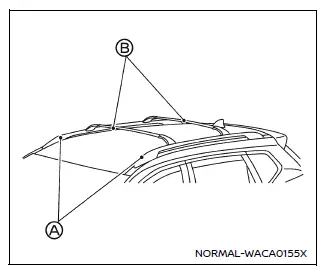
Example
Basic information
WARNING
- In the Nissan Armada, always install the crossbars onto the roof side rails before placing any cargo. Loading items directly onto the roof rails or roof surface may result in vehicle damage.
- Ensure that Nissan Armada roof rack crossbars are mounted evenly and securely to maintain proper balance.
- Never exceed the specified load capacity of the Nissan Armada roof rack crossbars, and always distribute weight uniformly.
- Excessive or uneven loading on the Nissan Armada roof rack may negatively impact vehicle stability, especially during sharp turns or sudden maneuvers.
- Secure all cargo properly using ropes or straps to prevent shifting. Unsecured cargo on the Nissan Armada roof rack can become dangerous in emergency situations.
- Drive with extra caution when the Nissan Armada is carrying roof cargo, particularly when approaching maximum load limits.
- When using the side step to access the roof of the Nissan Armada, ensure the door is open. Standing on the step with the door closed may lead to loss of balance and injury.
CAUTION
- Use caution when loading or unloading items from the Nissan Armada roof rack. If lifting from ground level is difficult, use a stable ladder or step stool for safety.
Do not apply any load directly to the roof side rails A of the Nissan Armada. Crossbars B (if equipped) must be properly installed before placing any cargo, luggage, or equipment on the roof.
Genuine Nissan Armada accessory crossbars are available through authorized dealers, and it is strongly recommended to consult a Nissan dealer for correct installation and compatibility.
The maximum service load capacity for the Nissan Armada roof side rails is 221 lb (100 kg). However, always follow the specific load rating of the installed crossbars.
Additionally, ensure that the total vehicle weight, including roof cargo, does not exceed the Nissan Armada Gross Vehicle Weight Rating (GVWR) or Gross Axle Weight Rating (GAWR) for both front and rear axles.
- Refer to the F.M.V.S.S. or C.M.V.S.S. certification label located on the Nissan Armada driver’s door pillar for exact specifications.
Installing crossbars (if so equipped)
WARNING
- For proper installation of Nissan Armada roof rack crossbars, it is recommended to have the work performed by an authorized Nissan dealer.
- Protect the painted roof surface of the Nissan Armada by placing a soft cloth beneath the crossbars during installation to avoid scratches or damage.
- Ensure that the Nissan Armada moonroof is fully closed before installing crossbars to prevent accidental damage.
The Nissan Armada roof rack system is designed to increase cargo versatility, making it ideal for transporting luggage, sports equipment, or travel gear while maintaining interior space and passenger comfort.
Other materials
BSW system limitations
WARNING
The following limitations apply to the Nissan Armada Blind Spot Warning (BSW)
system. Ignoring these limitations or relying solely on the system may lead to serious
injury or even fatal accidents.
The Nissan Armada BSW system is not capable of detecting every vehicle
or object in ...
Front Disc Brake
Brake Pad
Inspection and Adjustment
WARNING:
Jacking up or lift up the vehicle may the vehicle height to go down which cause a personal injury and/or damage to the air suspension component parts. Refer to Precaution for when Jacking and Lifting Up the vehicle with Electronic Air Suspension System ...
Additional Service When Replacing Driver Monitor Camera Control Unit
Work Procedure
When driver monitor camera control unit is replaced, be sure to perform the specified incidental work in order to operate system normally.DRIVER MONOTOR CAMERA CONTROL UNIT CONFIGURATION
Perform saving vehicle internal information according to "Replace ECU" in CONSULT Operation Manual ...