Basic information
The Settings mode in the Nissan Armada provides drivers with a comprehensive interface for customizing both the vehicle information display and various system configurations. Through this menu, users can tailor the Nissan Armada driving experience according to personal preferences and driving conditions.
Within the Nissan Armada, the following categories can be accessed and adjusted:
- Driver Assistance
- Head-Up Display (if so equipped)
- ECO Mode Setting
- TPMS Setting
- Clock
- Vehicle Settings
- Towing Settings
- Maintenance
- Customize Display
- Unit/Language
- Factory Reset
Driver Assistance
The Nissan Armada allows full customization of advanced driver assistance systems. Using the scroll dial, drivers can activate, deactivate, or adjust warnings and system behaviors to enhance safety and comfort.
- Intelligent Cruise (if so equipped)
- Lane Centering Assist
- Lane Change Assist (if so equipped)
- Lane Assist
- Blind Spot Assist
- Emergency Assist
- Traffic Sign Assist
- Parking Assist
- Driver Monitor
- Sound Setting (if so equipped)
- Timer Alert
- Low Temp. Alert
- Chassis Control
Intelligent Cruise (if so equipped):
In the Nissan Armada, this menu allows detailed configuration of intelligent cruise control and ProPILOT Assist features for a smoother and more adaptive driving experience.
- Speed Adjust by Route (ProPILOT Assist 1.1 and 2.1)
Enables or disables automatic speed adjustments based on navigation data and road conditions. - Spd.Limit Assist (ProPILOT Assist 1.1 and 2.1)
Allows customization of how the Nissan Armada responds to detected speed limits:- OFF
- Manual
- Auto
- Speed Limit Offset
Provides the ability to fine-tune speed tolerance settings, ranging from -5 MPH (-10 km/h) to +5 MPH (+10 km/h), ensuring flexibility for different driving styles.
Lane Centering Assist:
- Steering Assist
Allows activation or deactivation of automatic steering support within lane markings in the Nissan Armada. - Hands Off Mode (if so equipped)
Enables or disables advanced hands-off driving functionality where available.
Lane Change Assist (if so equipped):
- Activate by turn signal
Controls whether the Nissan Armada assists with lane changes when the turn signal is used. - Passing Assist
Enables additional assistance during overtaking maneuvers. - Passing Setting
Allows selection of driving response style:- Sport
- Standard
- Comfort
Lane Assist:
- Warning
Controls the Lane Departure Warning (LDW) system activation. - Intervention
Enables or disables Intelligent Lane Intervention (I-LI), which actively helps keep the Nissan Armada within its lane. - Lane Sensitivity
Adjusts how aggressively the system responds (Strong, Normal, Mild).
Blind Spot Assist:
- Warning
Turns Blind Spot Warning (BSW) alerts ON or OFF. - Intervention
Controls Intelligent Blind Spot Intervention (I-BSI) functionality. - Trailer Blind Spot
Activates blind spot monitoring optimized for towing conditions in the Nissan Armada.
Emergency Brake:
This section allows drivers to enable or disable the Automatic Emergency Braking (AEB) system with Pedestrian Detection, as well as the Intelligent Forward Collision Warning (I-FCW), enhancing safety in critical situations.
Traffic Sign Assist:
The Nissan Armada can display and respond to detected traffic signs. Drivers can configure:
- Speed Limit Sign recognition
- Speed Limit Warning (if equipped)
Parking Assist:
The Parking Assist menu in the Nissan Armada provides extensive control over parking-related safety features. Using the scroll dial, drivers can adjust system behavior depending on vehicle configuration:
- Rear Cross Traffic Alert
Activates alerts for approaching vehicles when reversing. - Moving Object Detection (if so equipped)
Detects moving objects around the vehicle and provides warnings. - Front Sonar
Enables or disables front parking sensors. - Rear Sonar
Controls rear parking sensors.Note: When Trailer Blind Spot monitoring is active in the Nissan Armada, this option may be unavailable.
- Sonar Distance
Allows adjustment of detection range (Long, Medium, Short). - Auto Show Sonar
Automatically displays sonar information when obstacles are detected. - Sonar Volume
Adjusts alert sound level (High, Medium, Low).
Additional note: The Nissan Armada Settings menu is designed to provide maximum flexibility, allowing drivers to personalize safety systems, comfort features, and display preferences for a more intuitive and controlled driving experience.
Driver Monitor:
- Driver Alertness
Enables the user to activate or deactivate the Intelligent Driver Alertness (I-DA) system in the Nissan Armada, a feature designed to enhance driver awareness during long journeys. - Driver Monitor (if so equipped)
Provides control over the Driver Monitor system in the Nissan Armada, allowing it to be turned ON or OFF depending on driver preference and safety needs.
Sound Setting (if so equipped):
- Warning Volume
Allows the user to adjust the warning sound level in the Nissan Armada, choosing between High, Medium, or Low for optimal comfort and audibility.
Timer Alert:
This function allows the user to configure or reset the Timer Alert in the Nissan Armada, helping manage driving time and rest intervals more effectively.
- (Current Time)/(Set Time)
- Reset
Low Temp. Alert:
Provides the option to enable or disable the Low Temperature Alert in the Nissan Armada, helping drivers stay informed about potentially hazardous cold conditions.
Chassis Control:
- Trace Control
Allows the user to switch the Trace Control system ON or OFF in the Nissan Armada, improving handling and cornering stability when active.
Head-Up Display (if so equipped)
Within the Nissan Armada, the Head-Up Display settings can be customized using the scroll dial, allowing drivers to adjust visibility and displayed information for a more intuitive driving experience:
- Brightness
- Height
- Rotation
- Contents selection
- Navigation
- Driving Assist
- Speed Limit Sign
- Audio
- TEL/SMS
- Reset
ECO Mode Setting
This menu allows Nissan Armada drivers to fine-tune ECO mode parameters, optimizing fuel efficiency and driving behavior based on personal preferences.
To modify ECO Mode Settings in the Nissan Armada, use the scroll dial to navigate and adjust available options:
- ECO Customize (if so equipped)
- Cruise Control
- Idling stop
- Air Conditioning
- ECO Drive Assist
- ECO Drive Report
- View History
To reset the View History in the Nissan Armada:
- Select "View History" using the scroll dial and confirm by pressing it.
- Press the scroll dial again.
- Confirm by selecting "Yes" with the scroll dial.
- Tire Pres ECO advice
Press the scroll dial to enable or disable the "Tire Pres ECO advice" feature in the Nissan Armada, which supports efficient tire pressure management.
TPMS Setting
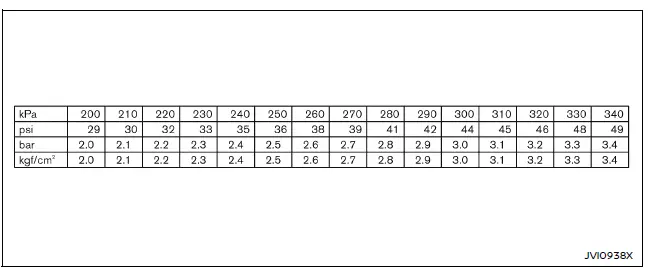
The TPMS submenu in the Nissan Armada provides access to tire pressure configuration options.
Tire Pressure Unit:
The Nissan Armada allows the tire pressure display unit to be customized according to user preference:
- psi
- kPa
- bar
- kgf/cm2
Use the scroll dial to select and apply the desired unit.
If needed, consult the conversion table below to switch between units.
Clock
Allows the user to enable or disable the clock display in the Nissan Armada vehicle information screen for a cleaner or more informative interface.
Vehicle Settings
The Nissan Armada vehicle settings menu enables customization of various systems to match driver preferences and improve overall usability.
- Power Back Door (if so equipped)
- Lighting
- Locking
- Wipers
- Driving Position (if so equipped)
- Rear Door Alert
- Mirrors (if so equipped)
All settings in the Nissan Armada can be adjusted conveniently using the scroll dial interface.
Power Back Door (if so equipped):
This feature allows the user to enable or disable the power liftgate function in the Nissan Armada for added convenience.
Lighting:
The Nissan Armada "Lighting" menu provides several customization options:
- Welcome Headlight
The welcome lighting feature in the Nissan Armada can be turned ON or OFF to enhance visibility when approaching the vehicle. - Accent Lighting (if so equipped)
Allows adjustment of interior ambient lighting brightness for a more personalized cabin atmosphere. - Light Off Delay
The automatic headlight delay in the Nissan Armada can be set between 0 and 180 seconds, offering flexibility when exiting the vehicle.
Locking:
The Nissan Armada "Locking" menu includes the following advanced options:
- Selective Unlock
When enabled, only the selected door or liftgate unlocks upon pressing the request switch. Pressing again within 60 seconds unlocks all doors.When disabled, all doors unlock simultaneously with one press. Use the scroll dial to toggle this feature in the Nissan Armada.
- Horn beeps on lock
When activated, the Nissan Armada emits a horn chirp and flashes hazard lights twice upon locking, confirming successful locking. - Auto Door Unlock
This feature allows Nissan Armada users to define automatic unlock conditions:- Shift to P
- Ignition OFF
- OFF
- Walk Away Lock
Automatically locks the Nissan Armada when the driver walks away, enhancing security. - Approach Unlock
Enables automatic unlocking when approaching the Nissan Armada, improving convenience and accessibility.
Use the scroll dial in the Nissan Armada to easily activate or deactivate this function, ensuring quick access and intuitive control over key vehicle features.
When this setting is enabled in the Nissan Armada, the request switches become fully operational, allowing convenient door access. Use the scroll dial to toggle this function ON or OFF according to your preference.
When this option is turned OFF, the Walk Away Lock and Approach Unlock systems in the Nissan Armada will also be automatically disabled, reducing automatic access features.
Wipers:
The Nissan Armada "Wipers" menu provides several advanced configuration options designed to enhance visibility and driving comfort in varying weather conditions:
- Rain Sensor
The rain-sensing automatic wiper system in the Nissan Armada can be activated or deactivated. This intelligent feature automatically adjusts wiper speed based on rainfall intensity. - Reverse Link
The Reverse Link function allows the Nissan Armada rear wiper to operate automatically when shifting into reverse. This feature can be turned ON or OFF using the scroll dial. - Drip Wipe
The drip wipe function in the Nissan Armada ensures that any remaining water droplets are cleared after the main wipe cycle. Use the scroll dial to enable or disable this feature.
Driving Position (if so equipped):
- Exit Seat Slide
This feature in the Nissan Armada automatically moves the driver's seat backward when exiting the vehicle for easier access. It can be turned ON or OFF using the scroll dial. - Exit Steering
The Nissan Armada can also adjust the steering wheel position upon exit, improving driver comfort. Use the scroll dial to enable or disable this entry/exit function.
Rear Door Alert:
Type A (if so equipped):
The Nissan Armada allows customization of the Rear Door Alert system, helping prevent items or passengers from being left in the rear seats.
- Horn & Alert
- Alert Only
- OFF
Type B (if so equipped):
This version of the Rear Door Alert system in the Nissan Armada can simply be turned ON or OFF depending on driver preference.
Mirrors (if so equipped):
The Nissan Armada provides multiple convenient settings for outside mirror operation:
- Auto Fold Off
- Unfold at Ignition
- Unfold at Unlock
Towing Settings
The Nissan Armada towing settings menu is designed to simplify trailer management and enhance safety when towing.
Trailer Light Check:
This feature allows the Nissan Armada to perform an automatic check of trailer lighting systems, ensuring all lights function correctly when a trailer is connected.
Additionally, this function can be conveniently activated using the Intelligent Key of the Nissan Armada.
Trailer Information:
The Nissan Armada displays both registered and currently selected trailer data for quick reference.
- Trailer Length
- Trailer BSW ON/OFF
Select Trailer:
This option allows the Nissan Armada driver to choose from previously registered trailers.
- Trailer name1 - Trailer name9 (appears if trailers are registered)
- Default Trailer
Edit Setting:
The Nissan Armada allows full customization of trailer data, including naming, adjusting length, or deleting stored trailer profiles.
This menu becomes available after adding trailer information through the "Add Trailer for BSW" feature in the Nissan Armada.
- Trailer name1 - Trailer name9
- Rename Trailer
The Nissan Armada allows precise renaming of trailers character by character using the scroll dial for accurate identification. - Edit Length
When selected in the Nissan Armada, the following confirmation message appears:"Is the width less than 9ft (2.7m) and the length less than 33ft (10m) ?" Select "Yes" to adjust the trailer length using the scroll dial, then press "OK" to save the updated information in the Nissan Armada.
If "No" is selected, the Nissan Armada will display a message indicating that Trailer BSW functionality is unavailable with the connected trailer.
- Delete Setting
When this option is selected in the Nissan Armada, the system will prompt:"Delete This Trailer?" Select "Yes" to permanently remove the stored trailer information.
- Rename Trailer
Add Trailer for BSW:
When this option is selected in the Nissan Armada, the system will display the following prompt:
"Is the width less than 9ft (2.7m) and the length less than 33ft (10m) ?"
NOTE:
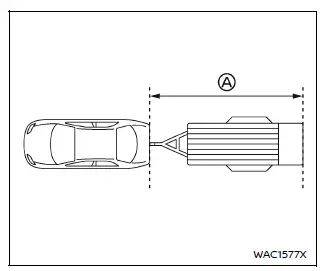
In the Nissan Armada, trailer length is defined as the distance from the rear bumper of the vehicle to the end of the attached trailer A, ensuring accurate system calibration.
- Yes: You can edit the trailer length by rotating and pressing the scroll
dial in the Nissan Armada.
Press "OK" to save the trailer information and ensure optimal towing performance.
Then, in the Nissan Armada, you can assign a custom name to the trailer by entering characters one by one using the scroll dial within the "Name" screen, ensuring accurate identification for each registered trailer.
Press "OK" to confirm and securely save the trailer information in the Nissan Armada system.
- No: If the specified trailer dimensions exceed the supported limits, the Nissan Armada will display the message "Trailer BSW is unavailable when this trailer connected". In this case, the trailer cannot be registered for Blind Spot Warning (BSW) functionality.
Maintenance
The Nissan Armada Maintenance mode provides a comprehensive overview of service intervals and allows the driver to monitor key vehicle components, including oil condition and tire service reminders.
To access Maintenance in the Nissan Armada, select "Maintenance" using the scroll dial and press to enter the menu.
- Oil Level
- Oil Control System
- Tire
- Other
- Suspension (if so equipped)
Oil Level:
The Nissan Armada Oil Level menu enables real-time monitoring of engine oil condition directly through the vehicle information display, improving maintenance accuracy.
To check the oil level in the Nissan Armada, select "Oil Level" from the Maintenance menu.
The system automatically evaluates oil level and condition during regular driving cycles for consistent monitoring.
"Oil Level OK": Indicates that the engine oil level in the Nissan Armada is within the optimal range.
"Low Oil Level": Indicates insufficient engine oil. Add the recommended oil type and recheck the level to ensure proper engine lubrication.
"High Oil Level": Indicates excessive oil. Reduce the oil quantity to prevent engine performance issues, then recheck the level.
How to update the Oil Level:
To accurately update the oil level measurement in the Nissan Armada, follow these steps carefully:
1. Park the Nissan Armada on a flat, level surface and engage the parking brake.
2. Start the engine and allow it to reach normal operating temperature.
3. Turn off the engine and wait at least 10 minutes to allow the oil to settle in the oil pan.
4. Turn the ignition ON without pressing the brake pedal. Do not start the engine.
5. Navigate to "Settings" → "Maintenance" → "Oil Level" in the Nissan Armada display.
6. Press the scroll dial and select "Update Oil Level" to initiate a new measurement.
If "Update Oil Level" is selected while the engine is running, the Nissan Armada will display the message "Turn off engine to update Oil Level".
NOTE:
For the most accurate oil level reading in the Nissan Armada, it is strongly recommended to follow the above procedure exactly. Skipping steps may result in inaccurate measurements.
Oil Control System:
The Nissan Armada Oil Control System calculates the remaining distance before the next oil change and helps maintain engine longevity. Oil changes should not exceed one year or 10,000 miles (16,000 km).
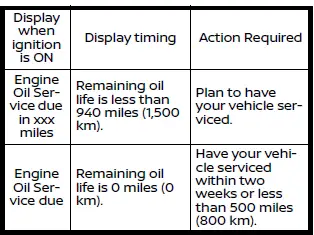
The oil change interval in the Nissan Armada cannot be manually adjusted, as it is automatically determined by driving conditions.
The system continuously evaluates usage patterns and displays a reminder when the service interval is approaching, ensuring timely maintenance.
If a Factory Reset is performed in the Nissan Armada, the oil control system will also reset to its initial state. It is important to replace the engine oil when performing this reset.
CAUTION
If the oil replacement indicator appears, change the engine oil within two weeks or before driving 500 miles (800 km) to prevent damage.
Driving the Nissan Armada with degraded or insufficient oil may cause serious engine damage and reduced performance.
To reset oil control system:
1. Turn the ignition switch of the Nissan Armada to the ON position.
2. Press the
 and
and
 buttons on the steering wheel until "Settings" appears in the display. Then select
"Maintenance" using the scroll dial.
buttons on the steering wheel until "Settings" appears in the display. Then select
"Maintenance" using the scroll dial.
Press the scroll dial to confirm your selection.
3. Choose "Oil Control System" and press the scroll dial.
4. Follow the reset instructions shown at the bottom of the Nissan Armada maintenance screen and confirm using the scroll dial.
Tire:
The Nissan Armada tire maintenance indicator alerts the driver when the preset distance for tire replacement has been reached, allowing timely servicing.
WARNING
The tire replacement indicator in the Nissan Armada does not replace regular tire inspections. Always check tire pressure and condition manually to ensure safe driving.
In the Nissan Armada, tire wear is influenced by multiple factors such as tire inflation pressure, wheel alignment, driving style, and road surface conditions. Therefore, even if a tire replacement interval is set, it does not guarantee that the tires will last for that exact distance. The tire replacement indicator in the Nissan Armada should be used strictly as a reference tool, not as a definitive measure. регулярні перевірки шин, включаючи контроль тиску, є обов’язковими для безпечної експлуатації автомобіля. Ігнорування цих перевірок може призвести до раптового пошкодження шин.
У Nissan Armada несправність шин може спричинити серйозні пошкодження автомобіля та втрату керування, що підвищує ризик аварії, травм або навіть смертельних наслідків. Саме тому регулярне обслуговування шин є критично важливим для безпеки.
Other:
У Nissan Armada цей індикатор з’являється, коли досягнуто встановленого інтервалу для перевірки або заміни інших елементів обслуговування, окрім моторної оливи та шин. До таких компонентів можуть належати повітряний фільтр, ротація шин або інші сервісні процедури. Користувач може самостійно встановити або скинути інтервал для цих перевірок через меню налаштувань.
Suspension (if so equipped):
- System
У Nissan Armada ця функція дозволяє вмикати або вимикати систему пневматичної підвіски для адаптації до різних дорожніх умов.
Навіть якщо система пневмопідвіски в Nissan Armada вимкнена вручну, вона автоматично активується під час початку руху автомобіля, забезпечуючи стабільність та комфорт.
Customize Display
Система налаштування дисплея в Nissan Armada дозволяє обрати різні варіанти відображення інформації на панелі приладів для більш зручного сприйняття даних.
Усі параметри дисплея в Nissan Armada легко змінюються за допомогою scroll dial, що забезпечує швидкий доступ до налаштувань.
Change Meter View:
У Nissan Armada ця функція дозволяє вибрати бажаний вигляд панелі приладів відповідно до стилю водія.
Main Menu Selection:
Відображає доступні екрани, які можна налаштувати для показу у інформаційному дисплеї Nissan Armada.
Route Guidance (if so equipped):
Для зміни параметрів навігації у Nissan Armada використовуйте scroll dial для вибору та підтвердження.
- Alerts
Функція "Alerts" дозволяє вмикати або вимикати навігаційні попередження в Nissan Armada.
ProPILOT Assist Display:
У Nissan Armada можна налаштувати відображення переходів системи ProPILOT Assist, увімкнувши або вимкнувши цю опцію.
Welcome Effect:
Цей розділ у Nissan Armada відповідає за налаштування ефектів привітання при запуску або відкритті автомобіля.
- Animation
- Sound
Operation Guidance:
Меню "Operation Guidance" у Nissan Armada надає доступ до підказок і допоміжних налаштувань для різних систем автомобіля.
- Lights
- Wiper
- Front
- Rear
- High Beam Assist
- Seat Memory (if so equipped)
Unit/Language
У Nissan Armada користувач може змінювати одиниці вимірювання та мову відображення інформації відповідно до своїх потреб.
- Mileage/Fuel
- Tire Pressure
- Temperature
- Language
Використовуйте scroll dial для швидкої зміни параметрів у Nissan Armada.
Mileage/Fuel:
У Nissan Armada можна змінювати одиниці вимірювання пробігу та витрати пального залежно від регіональних стандартів.
- miles, MPG
- km, km/l
- km, l/100km
Оберіть потрібний формат за допомогою scroll dial.
Tire Pressure:
Система Nissan Armada дозволяє обрати зручну одиницю вимірювання тиску в шинах:
- psi
- kPa
- bar
- kgf/cm2
Temperature:
Температурні значення в Nissan Armada можуть відображатися у вибраному форматі:
- ºC
- ºF
Перемикання здійснюється за допомогою scroll dial.
Language:
У Nissan Armada можна змінити мову інтерфейсу інформаційного дисплея відповідно до особистих вподобань водія.
Вибір мови виконується через scroll dial.
Factory Reset
У Nissan Armada всі налаштування дисплея можна повернути до заводських значень для відновлення стандартної конфігурації системи.
1. Виберіть "Factory Reset" за допомогою scroll dial і натисніть його.
2. Оберіть "Yes", щоб підтвердити скидання налаштувань Nissan Armada до початкового стану.
NOTE:
Після виконання Factory Reset у Nissan Armada всі додані дані про причепи для системи Trailer BSW будуть видалені.
Other materials
System temporarily unavailable
While operating the Nissan Armada, certain road environments such as winding
mountain routes, steep inclines, sharp curves, narrow lanes, or areas under construction
can temporarily affect the performance of the driver assistance systems. In these
situations, the sensors may incorrectly id ...
Low Tire Pressure Location Indicator Continues Displaying
Description
The low tire pressure location indicator continues displaying though low tire pressure warning lamp turns/stays OFF.
Diagnosis Procedure
CHECK TIRE PRESSURE
Ignition switch ON.
CAUTION:
Never start the engine.
Check the tire pressure for all wheels and adjust to the specified value. ...
Front Door Glass
Removal and Installation
REMOVALCAUTION:
Never damage front door glass and front door panel.Remove front door pull handle bracket. Refer to Removal and Installation.
Remove front door sash inner cover. Refer to Removal and Installation.
Remove hole seals from front door panel.
Reconnect power win ...