Exploded View
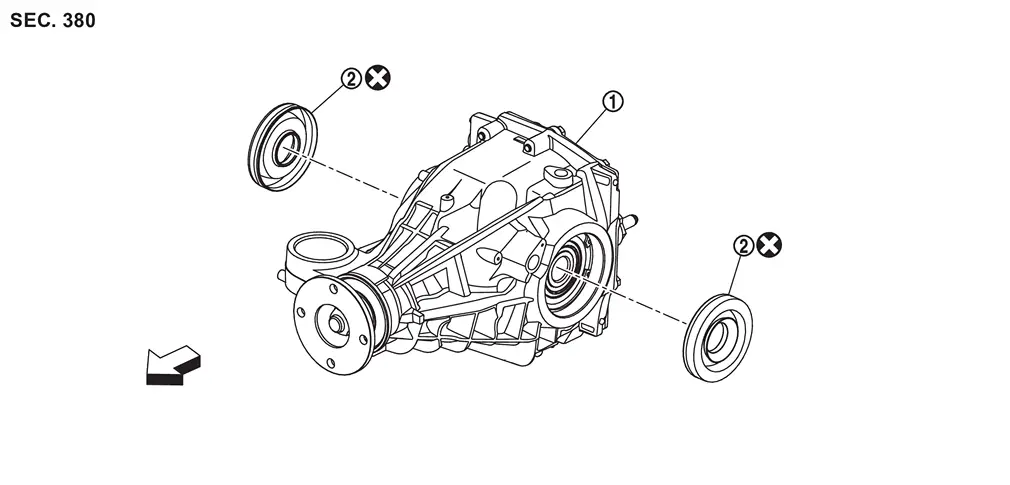
 |
Rear final drive assembly |  |
Side oil seal | ||
| : vehicle front | |||||
 : Always replace after every disassembly. : Always replace after every disassembly. |
|||||
Removal and Installation
WARNING:
-
Jacking up or lift up the vehicle may the vehicle height to go down which cause a personal injury and/or damage to the air suspension component parts. Refer to Precaution for when Jacking and Lifting Up the vehicle with Electronic Air Suspension System.
REMOVAL
Remove rear final drive assembly. Refer to Removal and Installation.
 NOTE:
NOTE:
It is necessary to remove rear final drive assembly to remove/install the side oil seal.
Remove side oil seal, using side oil seal puller (A) [SST: KV10122000 (NI-53383)] and sliding hammer (B) (commercial service tool).
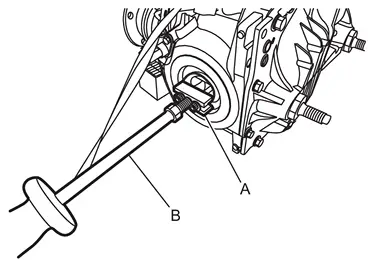
CAUTION:
Never damage gear carrier.
INSTALLATION
Note the following, and install in the reverse order of removal.
-
Install side oil seal until it becomes flush with the case end, using the side oil seal installer (A) [SST: KV10123000 (NI-53384)].
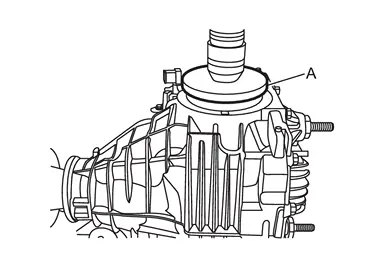
CAUTION:
-
Never reuse oil seal.
-
When installing, never incline oil seal.
-
Check that the oil seal lip is filled up with grease.
-
-
Perform inspection after installation. Refer to Inspection.
Inspection
INSPECTION AFTER INSTALLATION
Check the oil level and the oil leakage after installation. Refer to Inspection.
Other materials
Steering System Service Data and Specifications
Steering Wheel
Item Standard
Steering wheel axial end play
0 mm (0 in)
Steering wheel play on the outer circumference
0 – 35 mm (0 – 1.38 in)
Steering wheel turning force
34 N (3.5 kgf, 7.6 lbf) or less
Steering Angle
WITHOUT DINAMIC DIGITAL SUSPENSION AND ELECTRONIC AIR SUSPE ...
Second Seat Cushion
Disassembly and Assembly
DISASSEMBLYRemove seatback trim and pad. Refer to Disassembly and Assembly.
Disengage seat cushion trim fixing retainers .
LH seat
: vehicle front
RH seat
Disengage seat cushion trim fixing retainers .
LH seat
RH seat
Disengage seat cushion trim fixing ...
Maintenance Maintenance
Periodic Maintenance
The following tables show the normal maintenance schedule. Depending upon weather and atmospheric conditions, varying road surfaces, individual driving habits and vehicle usage, additional or more frequent maintenance may be required.Periodic maintenance beyond the last period s ...