If the AEB with Pedestrian Detection system in the Nissan Armada detects a malfunction, it will automatically deactivate to prevent incorrect operation. In such cases, an audible chime will sound, the AEB system OFF warning light (orange) will illuminate, and the message "Malfunction See Owner's Manual" will be displayed in the vehicle information screen. This behavior is designed to ensure that the driver of the Nissan Armada is immediately aware of any issue affecting the advanced safety system.
Action to take: If the warning indicator (orange) appears, carefully bring your Nissan Armada to a complete stop in a safe location. Turn off the engine and then restart it to check if the issue resolves. If the warning light remains illuminated after restarting, the system may require professional inspection. In this case, it is strongly recommended to have the Nissan Armada AEB with Pedestrian Detection system checked by an authorized NISSAN dealer to ensure continued safe operation.
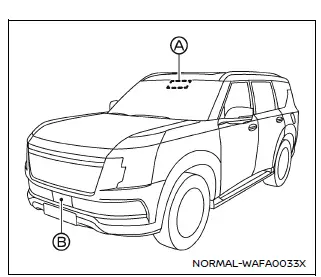
Example
Basic information
In the Nissan Armada, the radar sensor is installed at the front section of the vehicle, typically integrated into the grille or bumper area, while the camera is mounted at the upper portion of the windshield. These components work together to monitor the road ahead and detect vehicles or pedestrians, forming a key part of the Nissan Armada safety and driver assistance technologies.
To ensure that the AEB with Pedestrian Detection system in the Nissan Armada continues to function accurately and reliably, it is important to follow these maintenance guidelines and precautions:
- Always keep both the front sensor area and the windshield (especially around the camera) clean and free from dirt, ice, snow, or any obstruction.
- Avoid hitting, scratching, or damaging areas near the sensors, including the front bumper and windshield, as this may impair system performance.
- Do not place stickers, covers, or any objects on or near the sensor zones of the Nissan Armada, as this can interfere with detection and cause system malfunction.
- Do not install metallic accessories such as brush guards or similar equipment
near the radar sensor, since these may disrupt radar signals and reduce accuracy.
Interference in this area can significantly impact the effectiveness of the Nissan Armada AEB system.
- Avoid placing reflective items such as mirrors, glossy paper, or bright objects on the dashboard, as reflected sunlight may negatively affect the camera’s ability to detect objects.
- Do not modify, repaint, or remove components located near the sensor area.
Before performing any customization or repair in these zones, it is advisable
to consult an authorized NISSAN dealer to avoid damaging the Nissan Armada safety
systems.
Proper care of these components ensures long-term reliability of the Nissan Armada driver assistance features.
Radio frequency statement
For USA
This device complies with Part 15 of the FCC Rules.
Operation is subject to the following two conditions:
1. this device may not cause harmful interference and
2. this device must accept any interference received, including interference that may cause undesired operation.
Changes or modifications made to this equipment not expressly approved by Robert Bosch GmbH may void the FCC authorization to operate the equipment.
This equipment has been tested and complies with the limits for a Class A digital device under Part 15 of the FCC Rules. These standards are intended to provide reasonable protection against harmful interference in commercial environments. The equipment generates and uses radio frequency energy and, if not installed or used correctly according to instructions, may interfere with radio communications.
Operation of this equipment in a residential environment may result in interference, and in such cases, the user is responsible for resolving the issue at their own expense.
Radio frequency radiation exposure information:
This equipment complies with FCC radiation exposure limits for an uncontrolled environment. It should be installed and operated with a minimum distance of 20 cm between the radiator and the human body.
This transmitter must not be co-located or operated in conjunction with any other antenna or transmitter.
For Canada
This device contains licence-exempt transmitter(s)/receiver(s) compliant with Innovation, Science and Economic Development Canada RSS standards. Operation is subject to the following two conditions: (1) This device may not cause interference. (2) This device must accept any interference, including interference that may result in undesired operation.
L'émetteur/récepteur exempt de licence contenu dans cet appareil est conforme aux CNR d'Innovation, Sciences et Développement économique Canada applicables aux appareils radio exempts de licence.
L'exploitation est autorisée aux deux conditions suivantes : 1) L'appareil ne doit pas produire de brouillage; 2) L'appareil doit accepter tout brouillage radioélectrique subi, même si celui-ci est susceptible d'en compromettre le fonctionnement.
Other materials
RearView Monitor system limitations
WARNING
The Nissan Armada RearView Monitor has certain operational limitations that
must always be taken into account. Ignoring these limitations or relying solely
on the system without proper visual checks may result in serious injury or even
fatal accidents.
The Nissan Armada camera sys ...
Basic information
The front and rear sonar system in the Nissan Armada is designed to assist the
driver during parking and low-speed maneuvers by detecting obstacles around the
vehicle. Using ultrasonic sensors integrated into the front and rear bumpers, the
Nissan Armada provides audible tones and visual i ...
Towing your vehicle
Basic information
When towing a Nissan Armada, it is essential to comply with all applicable local
and regional regulations. Using incorrect towing methods or equipment can lead to
serious vehicle damage.
For safe and proper towing, it is highly recommended that a professional towing
service ...