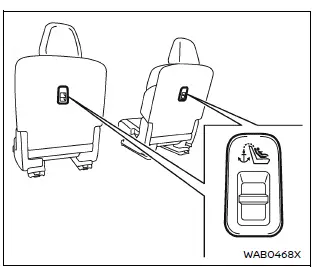
2nd row captain's seat
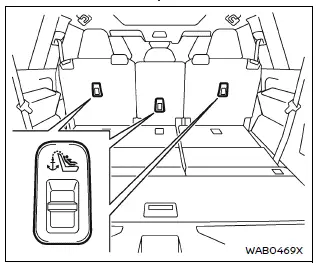
2nd row bench seat
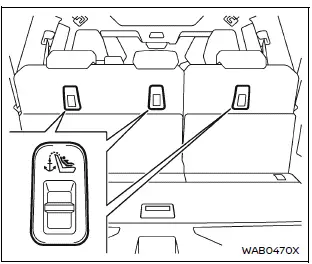
3rd row seat
Basic information
The Nissan Armada is equipped with dedicated top tether anchor points designed to enhance child restraint stability and safety. When a child restraint system includes a top tether strap, it must always be securely attached to the designated anchor point in the Nissan Armada to reduce forward movement of the seat during sudden stops or collisions.
WARNING
- The child restraint anchor points in the Nissan Armada are engineered
exclusively for use with properly installed child restraint systems.
Never use these anchor points for adult seat belts, cargo straps, or other equipment, as this may damage the anchors and compromise safety. A damaged anchor may result in improper installation and increase the risk of serious injury or death in an accident.
- Always ensure that cargo in the Nissan Armada is properly secured and
does not come into contact with the top tether strap.
Unsecured cargo or interference with the tether strap may damage it during a collision, significantly reducing its effectiveness and increasing the risk of injury.
Top tether anchor point locations
The Nissan Armada provides clearly marked tether anchor locations in the following seating positions:
- 2nd row bench seat (if equipped), located on the seatback.
- 2nd row captain's seats (if equipped), located on the seatback.
- 3rd row seats, located on the seatback.
If you have any questions regarding installation of a child restraint with a top tether strap in the Nissan Armada, it is recommended to consult an authorized NISSAN dealer for assistance.
Other materials
Rear Oil Seal
Exploded View
Transfer assembly
Rear oil seal
: vehicle front
: Always replace after every disassembly.
: Apply transfer fluid.
Removal and Installation
WARNING:
Jacking up or lift up the vehicle may the vehicle height to go down which cause a personal injury and/ ...
Heater & Air Conditioning System Tools and Preparation
Commercial Service Tools
HFO-1234yf (R-1234yf) Service Tool and Equipment
Never mix HFO-1234yf (R-1234yf) refrigerant and/or its specified lubricant with CFC-12 (R-12) or HFC-134a (R-134a) refrigerant and/or its lubricant.
Separate and non-interchangeable service equipment must be used for handli ...
Advanced Ambient Light (front Door Upper)
Exploded View
Advanced ambient light (front door upper) is integrated structure with front door finisher. For exploded view of front door finisher, refer to Exploded View.
Replacement
CAUTION:
Disconnect the battery negative terminal or remove power circuit fuse when performing the operation for p ...