Exploded View
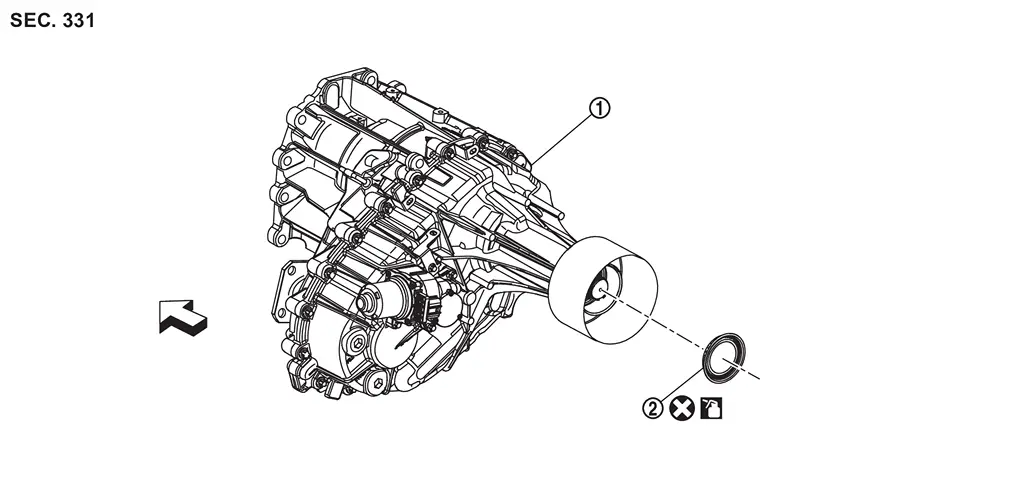
 |
Transfer assembly |  |
Rear oil seal | ||
 |
: vehicle front | ||||
 |
: Always replace after every disassembly. | ||||
 |
: Apply transfer fluid. | ||||
Removal and Installation
WARNING:
-
Jacking up or lift up the vehicle may the vehicle height to go down which cause a personal injury and/or damage to the air suspension component parts. Refer to Precaution for when Jacking and Lifting Up the vehicle with Electronic Air Suspension System.
REMOVAL
Remove the drain plug to drain the transfer fluid. Refer to Draining.
Remove the rear propeller shaft. Refer to Removal and Installation.
Remove the rear oil seal.
CAUTION:
Never damage rear case and output shaft.
INSTALLATION
Install rear oil seal with a drift (commercial service tool) until metal flange part  reach the surface of rear case .
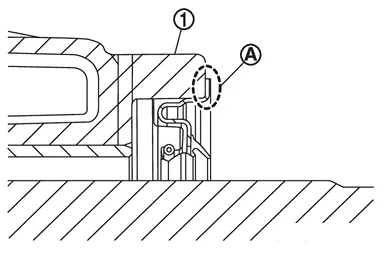
CAUTION:
-
Never reuse rear oil seal.
-
Apply transfer fluid onto circumference of oil seal.
-
When installing, never incline rear oil seal.
-
Never handle the oil seal inner periphery and oil seal lip.
Install the rear propeller shaft. Refer to Removal and Installation.
Fill with new transfer fluid. Refer to Refilling.
Inspection
INSPECTION AFTER INSTALLATION
Check fluid leakage and the fluid level. Refer to Inspection.
Other materials
Trip computer
Example
Basic information
In the Nissan Armada, the trip computer is controlled using intuitive switches
located directly on the steering wheel, allowing the driver to navigate menus without
distraction.
Scroll dial - in the Nissan Armada this control enables smooth navigation
throu ...
Auto Door Lock Operation Does Not Operate. Automatic Back Door Control Unit
Automatic Back Door Control Unit
Diagnosis Procedure
REPLACE INTELLIGENT KEY UNIT
Replace Intelligent Key unit. Refer to Removal and Installation.
Confirm the operation after replacement.
Is the result normal?
YES>>
INSPECTION END
NO>>
Check intermittent incident. Refer to Inter ...
Driving Video Recorder System System Symptoms
Symptom Table
Symptom Possible cause Inspection item/Work item
��is displayed
Front camera (driving video recorder) abnormality
Rear camera (driving video recorder) abnormality
Inside camera (driving video recorder) abnormality
Perform diagnosis procedure
�� is displayed ...