Before installing a child restraint in the Nissan Armada, carefully review all warnings and precautions provided in the "Child safety" and "Child restraints" sections of this manual.
Do not use the LATCH lower anchors if the combined weight of the child and the child restraint exceeds 65 lbs (29.5 kg). In such cases, the child restraint must be installed using the vehicle’s seat belt instead. Always follow the instructions provided by the child restraint manufacturer when installing in the Nissan Armada.
Follow these steps to install a rear-facing child restraint in the 2nd row seats of the Nissan Armada using the LATCH system:
1. Position the child restraint securely on the seat in the Nissan Armada.
Always follow the instructions supplied by the child restraint manufacturer for correct placement.
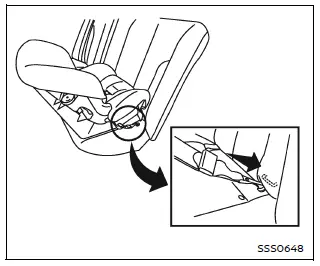
Rear-facing web-mounted - step 2
2. Attach the child restraint connectors to the LATCH lower anchors. Ensure that each attachment is properly engaged and securely fastened.
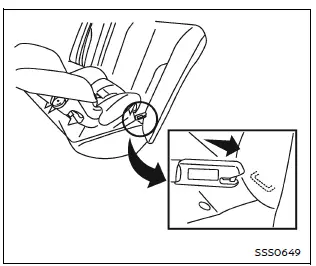
Rear-facing rigid-mounted - step 2
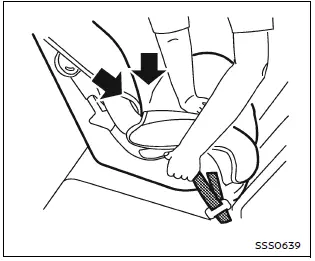
Rear-facing - step 3
3. For child restraints equipped with webbing-mounted attachments, remove any slack by pressing firmly downward and rearward on the child restraint. This compresses the seat cushion and ensures a tighter, more secure fit in the Nissan Armada.
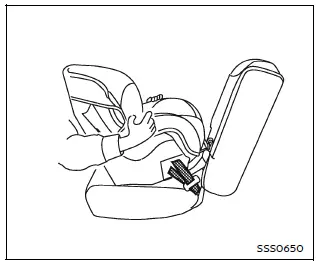
Rear-facing - step 4
4. After installation, test the stability of the child restraint before placing the child inside. Hold the restraint near the LATCH attachment points and attempt to move it side to side.
The child restraint should not move more than 1 inch (25 mm). Also pull it forward to ensure the anchors are holding securely.
If the restraint is not stable, tighten the attachments or try a different seating position in the Nissan Armada. If necessary, install the restraint using the vehicle seat belt instead.
Keep in mind that not all child restraint systems fit all vehicles perfectly, including the Nissan Armada.
5. Before each use, verify that the child restraint is securely installed. If any looseness is detected, repeat the installation steps to ensure maximum safety.
Proper installation of child restraints in the Nissan Armada is essential for protecting young passengers and ensuring safe travel under all driving conditions.
Other materials
Mixture Ratio Self-Learning Value Clear
Description
This describes how to erase the mixture ratio self-learning value. For the actual procedure, follow the instructions in “Diagnosis Procedure�. (For details, refer to Work Procedure .)
Work Procedure
START
With CONSULT
Start engine and warm it up to normal operating temperature.
O ...
Compressor Does Not Operate
Description
SYMPTOMCompressor does not operate.
Diagnosis Procedure
NOTE:
Perform self-diagnoses with CONSULT before performing symptom diagnosis. If any DTC is detected, perform the corresponding diagnosis.
Check that refrigerant is enclosed in cooler cycle normally. If refrigerant amount is s ...
Glove Box Lid Lock Cylinder
Exploded View
Glove box assembly
Sleeve
Glove box lid lock cylinder
Removal and Installation
REMOVAL NOTE:
Glove box lid lock key cylinder is integrated with glove box assembly. So, glove box lid lock key cylinder cannot be removed from glove box assembly and it cannot be replaced without ...