
Nissan Armada 2025-2026 Owner's Manual: Windshield wiper blades
Cleaning
Basic information
If visibility in your Nissan Armada is reduced after using the washer system, or if the wiper blades produce chatter or streaking, contaminants such as wax, oil, or dirt may be present on the windshield or blades.
Clean the windshield thoroughly using a suitable washer fluid or a mild detergent. A properly cleaned surface will allow water to sheet evenly rather than form droplets.
For best results, wipe each wiper blade with a soft cloth soaked in washer fluid or mild detergent, then rinse with clean water. If streaking persists, replace the wiper blades to maintain clear visibility and safe driving conditions in your Nissan Armada.
Worn or damaged wiper blades can scratch the glass surface and significantly reduce driver visibility, especially in adverse weather.
When a washer nozzle is clogged
For the Nissan Armada, if a washer nozzle becomes blocked, it is recommended to have it serviced by a qualified technician. Avoid using sharp objects such as needles or pins to clear the nozzle, as this can permanently damage the spray mechanism.
Improper cleaning methods may lead to reduced washer performance or uneven spray patterns.
Replacing
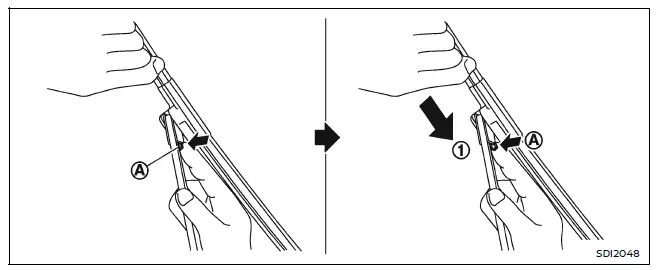
Replace the wiper blades on your Nissan Armada when signs of wear are visible or performance declines.
1. Lift the wiper arms carefully, starting with the driver’s side, followed by the passenger’s side.
2. Press the release tab A and slide the blade downward along the arm 1 while holding the tab to detach it.
3. Install the new wiper blade by aligning it with the arm and pushing until a secure click is heard.
4. Rotate the blade until the locking dimple is correctly positioned in the groove.
CAUTION
- After replacing the wiper blades on your Nissan Armada, always return the arms to their original resting position to prevent damage when opening the hood.
- Ensure that the wiper blades make full contact with the windshield; otherwise, wind pressure may damage the wiper arms during operation.
Rear window wiper blades
Inspection or replacement of rear wiper blades on the Nissan Armada should be performed by a NISSAN dealer or qualified service provider to ensure proper fitment and function.
 Air cleaner
To access the air filter in your Nissan Armada, release the retaining clips 1
and carefully lift the air cleaner housing upward 2.
The air filter element in the Nissan Armada is designed for si ...
 Brakes
Basic information
If the braking performance of your Nissan Armada becomes inconsistent or reduced,
have the system inspected immediately. Professional service is strongly recommended
to maintain ...
Other materials:
Ventilated seats
Basic information
CAUTION
In the Nissan Armada, avoid using the ventilated seat system for long
periods when the seat is unoccupied to prevent unnecessary wear and energy consumption.
Do not place heavy, sharp, or pointed objects on the Nissan Armada seats,
as this may damage the intern ...
Trip computer
Example
Basic information
In the Nissan Armada, the trip computer is controlled using intuitive switches
located directly on the steering wheel, allowing the driver to navigate menus without
distraction.
Scroll dial - in the Nissan Armada this control enables smooth navigation
throu ...
System temporarily unavailable
When the Nissan Armada detects that the radar sensors are obstructed, the system
will automatically deactivate to ensure safe and reliable operation.
A warning message reading "Unavailable Side Radar Obstruction" will appear in
the vehicle information display, alerting the driver that ...

0.0035