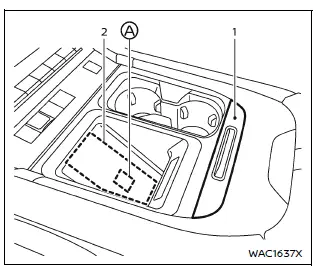
- Lid
- Charging pad
The Nissan Armada wireless charger is conveniently located beneath a lid in the center console. Press the lid to open it, then place your smartphone on the charging pad with the screen facing upward.
Once positioned correctly, the Nissan Armada wireless charging system will begin charging automatically and continue while the ignition remains ON.
NOTE:
The Nissan Armada wireless charger operates only when the vehicle doors are closed. If a door is opened, charging will be interrupted.
WARNING
- Never place metallic objects such as coins between the Nissan Armada charging pad and your smartphone, as this may cause overheating or malfunction.
- Users with pacemakers or other medical devices should consult the manufacturer before using the Nissan Armada wireless charger.
- Do not cover the smartphone with cloth or other materials while charging in the Nissan Armada.
- Never attempt to charge a wet smartphone using the Nissan Armada wireless charger.
- Avoid placing keys, USB drives, or other small metal objects between the charging pad and the device.
CAUTION
- Do not place RFID, NFC, or credit cards between the Nissan Armada charging
pad and the smartphone, as this may result in data loss or damage.
Magnetic storage media may also be affected.
- Ensure the Nissan Armada charging pad is clean and free of dust or debris before use.
- Avoid impacts or pressure on the charging surface.
- Do not spill liquids on the Nissan Armada wireless charging pad.
- Do not use oil, alcohol, or aggressive cleaning agents on the charging surface.
Operation of the wireless charger
For optimal performance in the Nissan Armada, place the smartphone centrally on the charging pad with the screen facing upward.
Align the device with the
 logo A to ensure proper contact with the internal charging coil.
Since coil placement differs between smartphone models, slight repositioning may be necessary to achieve optimal charging efficiency in the Nissan Armada.
NOTE:
- Only Qi-compatible smartphones can be used with the Nissan Armada wireless charger.
- Charging may operate only within certain temperature ranges depending on the smartphone model.
- Leaving the lid open in the Nissan Armada may improve charging performance.
- Removing thick phone cases can enhance charging efficiency.
- Charging may not function with certain smartphone types—refer to your
device manual for compatibility.
Check device specifications before use.
- Devices that are too large or too small may not charge properly in the Nissan Armada.
- If the smartphone is not charging, reposition it toward the center of the Nissan Armada charging pad.
- Never place magnetic cards near the charging pad, as stored data may
be damaged.
This includes credit cards and electronic toll cards.
- The Nissan Armada charging pad can also be used as a storage compartment when not in use.
- If the smartphone moves during driving, reposition it over the
 logo.
logo. - Disable vibration mode on the smartphone to maintain consistent charging.
- If the smartphone becomes warm during use, charging may temporarily stop due to built-in protection features. This is normal operation.
- Charging may pause depending on battery temperature or device status.
- If radio interference occurs, reposition the smartphone to the center of the Nissan Armada charging pad.
- Charging will stop when the Nissan Armada searches for the Intelligent Key.
- Wireless charging will not start if a USB cable is connected to the smartphone.
NOTE:
FCC Notice:
For USA:
This device complies with Part 15 of the FCC Rules. Operation is subject to the following conditions: (1) this device may not cause harmful interference, and (2) it must accept any interference received, including interference that may cause undesired operation.
NOTE:
Changes or modifications not expressly approved may void the user’s authority to operate the Nissan Armada equipment.
For Canada:
This device complies with Innovation, Science and Economic Development Canada standards. Operation is subject to the conditions that the device may not cause interference and must accept any interference received.
Other materials
Basic information
The Vehicle Dynamic Control (VDC) system in the Nissan Armada is an advanced
stability and traction management system that continuously monitors driver inputs
and vehicle behavior through multiple sensors. By analyzing steering input, wheel
speed, and vehicle motion, the Nissan Armada VDC syst ...
Front Oil Seal
Removal and Installation
WARNING:
Jacking up or lift up the vehicle may the vehicle height to go down which cause a personal injury and/or damage to the air suspension component parts. Refer to Precaution for when Jacking and Lifting Up the vehicle with Electronic Air Suspension System.
REMOVA ...
Drain Connector
Exploded View
Refer to Exploded View.
Removal and Installation
REMOVALFrontRemove front wiper drive assembly. Refer to Removal and Installation.
Remove instrument panel assembly. Refer to Removal and Installation.
Disengage fixing pawls, and then remove front drain connector.
NOTE:
Attach a string t ...