
Nissan Armada 2025-2026 Owner's Manual: Difference between predictive and actual distances
Basic information
The Nissan Armada display guide lines and their projected positions on the ground are intended as approximate references only and should not be relied upon as exact measurements.
Due to factors such as road incline, uneven terrain, and objects that extend outward, the actual distance of objects may differ significantly from what is shown on the Nissan Armada monitor relative to the guide lines.
For maximum safety when reversing your Nissan Armada, always verify surroundings by turning your head, using mirrors, or exiting the vehicle if necessary to visually confirm object positions.
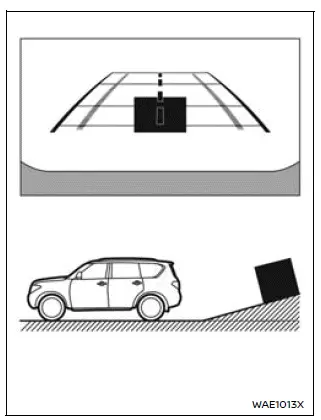
Backing up on a steep uphill
When reversing the Nissan Armada uphill, the distance guide lines and vehicle width indicators will appear closer than the actual distance.
This means that objects displayed on the monitor are farther away than they appear, requiring extra caution when maneuvering.
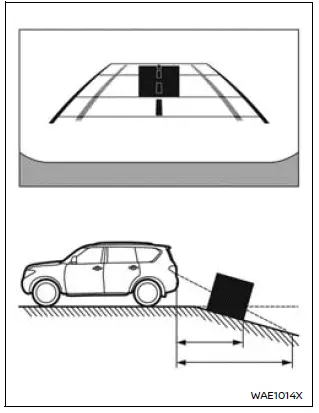
Backing up on a steep downhill
When reversing downhill in the Nissan Armada, the guide lines will appear farther than the actual distance.
As a result, objects are closer than they seem on the display, increasing the risk of misjudgment if relying solely on the screen.
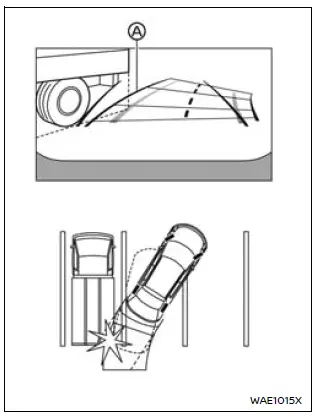
Backing up near a projecting object
The Nissan Armada predictive course lines A may visually avoid contact with an object on the display.
However, if the object extends into the actual driving path, the Nissan Armada may still come into contact with it despite what is shown on the screen.
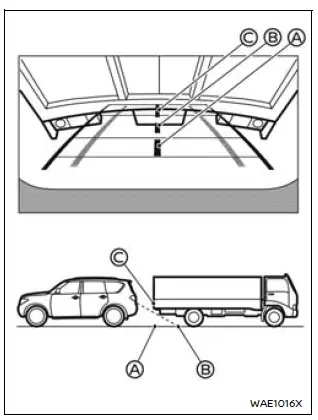
Backing up behind a projecting object
On the Nissan Armada display, position C may appear farther away than position B.
In reality, position C is at the same distance as position A. This visual distortion can lead to incorrect judgment, and the Nissan Armada may strike the object if it extends into the vehicle’s path.
 Intelligent Around View Monitor system operation
The Nissan Armada Intelligent Around View Monitor utilizes multiple strategically
positioned cameras 1, including units mounted in the front grille, beneath the outside
mirrors, and above the ...
 How to park with predictive course lines
Basic information
WARNING
If the Nissan Armada is equipped with tires of a different size than
standard, the predictive course lines may become inaccurate.
On slippery or snow-covered roads, ...
Other materials:
Supplemental air bag warning light
In the Nissan Armada, the supplemental air bag warning light, identified by the
symbol
displayed in the instrument cluster, continuously monitors the integrity of the
air bag systems, pretensioners, and all associated wiring circuits.
When the ignition switch of the Nissan Armada is tur ...
How to enable/disable the BSW system
Vehicle information display
Steering-wheel-mounted controls (right side)
To configure the Nissan Armada BSW system, follow these steps:
1. Press the
button until "Settings" appears in the vehicle information display, then confirm
using the scroll dial. Navigate to " ...
Driver Monitor (ProPILOT Assist 2.1)
Basic information
In the Nissan Armada equipped with ProPILOT Assist 2.1, the Driver Monitor system
plays a critical role in ensuring driver awareness and safety. Using a driver-facing
camera mounted on the steering column, the system continuously evaluates the driver’s
attentiveness by ana ...

0.0032