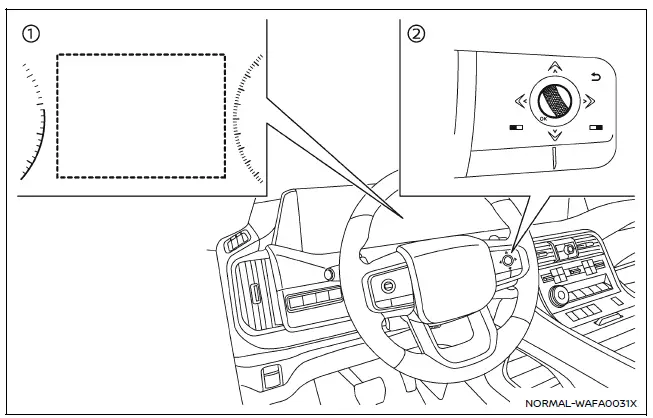
- Vehicle information display
- Steering-wheel-mounted controls (right side)
Follow these steps to activate or deactivate the Nissan Armada RCTA system:
1. Press the
 button until the "Settings" menu appears in the vehicle information display, then
confirm using the scroll dial.
button until the "Settings" menu appears in the vehicle information display, then
confirm using the scroll dial.
Select "Driver Assistance" using the scroll dial, and press to confirm.
2. Navigate to "Parking Assist", then select "Rear Cross Traffic Alert", and confirm your selection.
3. Use the scroll dial to turn the Nissan Armada RCTA system ON or OFF as desired.
NOTE:
The Nissan Armada will retain the selected RCTA settings even after the engine is restarted, ensuring consistent operation.
RCTA system limitations
WARNING
The following limitations apply to the Nissan Armada RCTA system. Failure to recognize these limitations may result in serious injury or fatal accidents.
- Always visually confirm the area behind and around your Nissan Armada
before reversing. The radar sensors detect moving vehicles only and cannot identify
all obstacles such as:
- Pedestrians, cyclists, animals, or small objects
- Vehicles traveling faster than approximately 19 MPH (30 km/h)
- Vehicles moving slower than approximately 5 MPH (8 km/h)
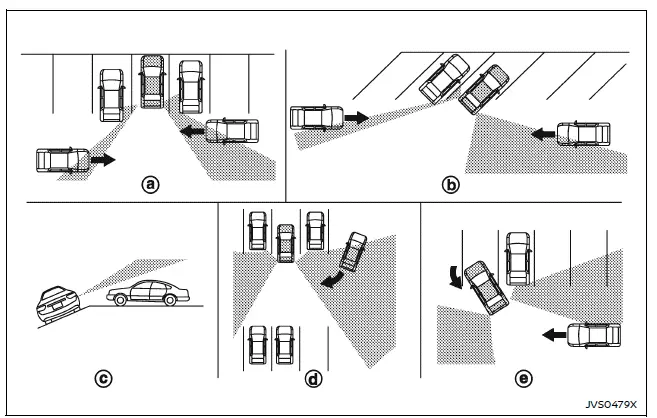
- The Nissan Armada radar sensors may fail to detect vehicles in certain
conditions, including:
- When nearby parked vehicles block radar signals (Illustration a)
- When parked at an angle (Illustration b)
- When parked on a slope or uneven terrain (Illustration c)
- When an approaching vehicle turns into the lane behind you (Illustration d)
- When the angle between your Nissan Armada and the approaching vehicle is minimal (Illustration e)
- Detection capability may be reduced in adverse conditions such as:
- Heavy rain, snow, or fog
- Water spray from the road
- Accumulation of ice, frost, or dirt on the vehicle
- Avoid placing stickers, transparent films, accessories, or additional
paint near the radar sensors on your Nissan Armada.
Such modifications may interfere with proper detection and system performance.
- High noise levels (such as loud audio systems or open windows) may prevent the driver from hearing the warning chime.
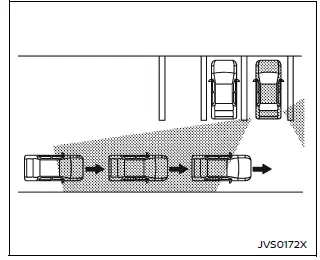
Illustration 1
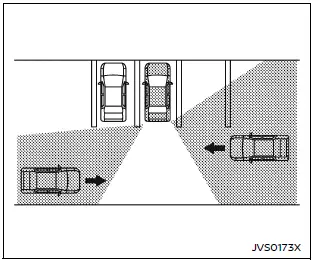
Illustration 2
NOTE:
In scenarios where multiple vehicles approach in sequence (Illustration 1) or from opposing directions (Illustration 2), the Nissan Armada RCTA system may not emit additional warning chimes after the first detected vehicle passes the sensors.
The Nissan Armada RCTA system significantly enhances reversing safety, but it should always be used as a support system in combination with careful driver attention and awareness. :contentReference[oaicite:0]{index=0}
Other materials
Calibration of Automatic Back Door Position Information
Description
When the following work is performed, it is necessary to perform initial setting of automatic back door position information to operate automatic back door system. Refer to Work Procedure.
After removing and installing, or replacing back door assembly
After removing and installing, or ...
Front Washer Nozzle and Tube
Exploded View
Front washer nozzle LH
Front washer nozzle tube LH
Front washer nozzle RH
Front washer nozzle tube RH
Check valve
Front washer tube C
Connector
Front washer tube B
Front washer tube A
Washer tank assembly
: Pawl
Hydraul ...
Nissanconnect Symptoms
Symptom Table
RELATED TO NAVIGATIONTrouble diagnosis chart by symptom Symptoms Check items Possible malfunction location/Action to take
AV control unit does not start.
Display is not indicated.
AV control unit power supply and ground circuit.
Refer to Diagnosis Procedure.
Blue screen is d ...