Example
Basic information
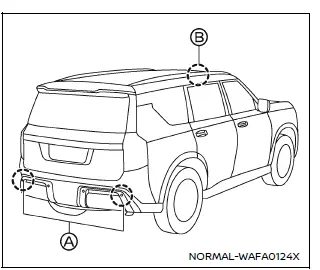
The two radar sensors A for the I-BSI system are located near the rear bumper.
Always keep the area near the radar sensors clean.
The radar sensors may be blocked by temporary ambient conditions such as snow, splashing water, mist or fog.
The blocked condition may also be caused by objects such as ice, frost or dirt obstructing the radar sensors.
Check for and remove objects obstructing the area around the radar sensors.
Do not attach stickers (including transparent material), install accessories or apply additional paint near the radar sensors.
Do not attach metallic objects near the sensor area (brush guard, etc.).
Do not strike or damage the area around the radar sensors.
It is recommended you visit a NISSAN dealer if the area around the radar sensors is damaged due to a collision.
The lane camera unit B for I-BSI system is located above the inside mirror. To keep the proper operation of I-BSI and prevent a system malfunction, be sure to observe the following:
- Always keep the windshield clean.
- Do not attach a sticker (including transparent material) or install an accessory near the camera unit.
- Do not place reflective materials, such as white paper or a mirror, on the instrument panel. The reflection of sunlight may adversely affect the camera unit's capability of detecting the lane markers.
- Do not strike or damage the areas around the camera unit. Do not touch the camera lens or remove the screw located on the camera unit. It is recommended you contact a NISSAN dealer if the camera unit is damaged due to an accident.
Precautions on repairing the bumper
When repairing the bumper, take caution because the radar sensors are installed on the bumper.
The radar sensor detects objects by emitting a radar signal and then measuring its reflection.
WARNING
If an improper repair is performed on the bumper (for example, application of putty made from different materials, repaint, etc.) the radar signal could be weakened or prevented from functioning properly. This may cause the radar sensor not to detect objects correctly. Improper repair may result in serious personal injury.
If it is necessary to repair the bumper, it is recommended you visit a NISSAN dealer for this service.
Radio frequency statement
For USA
This device complies with Part 15 of the FCC Rules. Operation is subject to the following two conditions: (1) this device may not cause harmful interference, and (2) this device must accept any interference received, including interference that may cause undesired operation.
CAUTION TO USERS
Changes or modifications not expressly approved by the party responsible for compliance could void the user`s authority to operate the equipment.
For Canada
This device contains license-exempt transmitter(s)/receiver(s) that comply with Innovation, Science and Economic Development Canada's license-exempt RSS(s). Operation is subject to the following two conditions: (1) This device may not cause interference. (2) This device must accept any interference, including interference that may cause undesired operation of the device.
Other materials
Noise, Vibration and Harshness (nvh) Troubleshooting
NVH Troubleshooting Chart
Use the chart below to find the cause of the symptom. If necessary, repair or replace these parts. Possible cause and SUSPECTED PARTS Symptom Reference
Vibration Shake Noise
Uneven rotating torque
×
×
Inspection
Center bearing improper installation
× ...
Side Oil Seal
Exploded View
Rear final drive assembly
Side oil seal
: vehicle front
: Always replace after every disassembly.
Removal and Installation
WARNING:
Jacking up or lift up the vehicle may the vehicle height to go down which cause a personal injury and/or damage to the air su ...
Low Tire Pressure Location Indicator Does Not Display
Description
When low tire pressure, low tire location indicator does not display though low tire pressure warning lamp turns ON.
Diagnosis Procedure
CHECK COMBINATION METER
Check combination meter. Refer to Work flow.
Is the inspection result normal?
YES>>
GO TO 2.
NO>>
Repair or repla ...