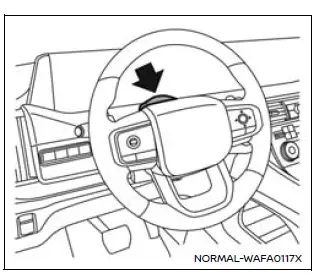
To ensure optimal performance of the Nissan Armada ProPILOT Assist 2.1 system, it is essential to keep the driver monitor area clean and unobstructed at all times.
Carefully remove any dust, dirt, or smudges using a clean, soft cloth such as a lens-cleaning cloth. Maintaining a clear camera surface allows the Nissan Armada driver monitoring system to accurately detect driver attention and ensure safe system operation.
TERMS OF USE OF USHR INC. MATERIAL AND AGREEMENT TO END USER SUBLICENSE AGREEMENT
This Nissan Armada vehicle integrates advanced data, proprietary software, and intellectual property elements, collectively referred to as “Ushr Materials,� which are embedded within the driver assistance systems. These materials are licensed from Ushr Inc. and are subject to specific terms and conditions.
By using the Nissan Armada and its associated systems, you acknowledge and agree to comply with the Ushr Inc. Terms of Use and End User Sub-License Agreement. These terms are available at www.ushrauto.com/legal and are incorporated by reference into this vehicle documentation. If you do not accept these terms, you must refrain from using the associated systems and materials.
The license agreement affects your legal rights and includes, among other provisions, usage restrictions, limitations of liability, intellectual property protections, and a waiver of jury trial rights. The Ushr Materials are provided strictly on an “AS IS� basis without any warranties of any kind.
All Ushr Materials, including software and confidential information, are protected and remain the exclusive property of Ushr Inc. Any unauthorized reproduction, extraction, modification, or transfer of these materials—whether in whole or in part—is strictly prohibited without prior written consent.
 2022
Ushr Inc. All Rights Reserved.
"Ushr", "Ushr Auto", associated logos, and related branding elements are trademarks and intellectual property of Ushr Inc., and all rights are reserved.
 OpenStreetMap
contributors, www.openstreetmap.org/copyright.
Other materials
Driving recorder system interface
Touch "
"
on the Launch Bar to access the applications menu.
Select the "Dash Cam" key to open the Nissan Armada driving recorder interface.
The "Dash Cam" shortcut can also be configured within the home screen of the
Nissan Armada touchscreen display for quicker ...
A/t Fluid Warmer
Exploded View
A/T assembly
A/T fluid warmer
O-ring
: N·m (kg-m, in-lb)
: Always replace after every disassembly.
: Apply ATF
Removal and Installation
WARNING:
Jacking up or lift up the vehicle may the vehicle height to go down which cause a personal injury and/or damage to ...
Squeak and Rattle Trouble Diagnoses
Work Flow
CUSTOMER INTERVIEW
The customer may not be able to provide a detailed description or the location of the noise. Attempt to obtain all the facts and conditions that exist when the noise occurs (or does not occur).
If there is more than one noise in the vehicle, perform a diagnosis and re ...