Exploded View
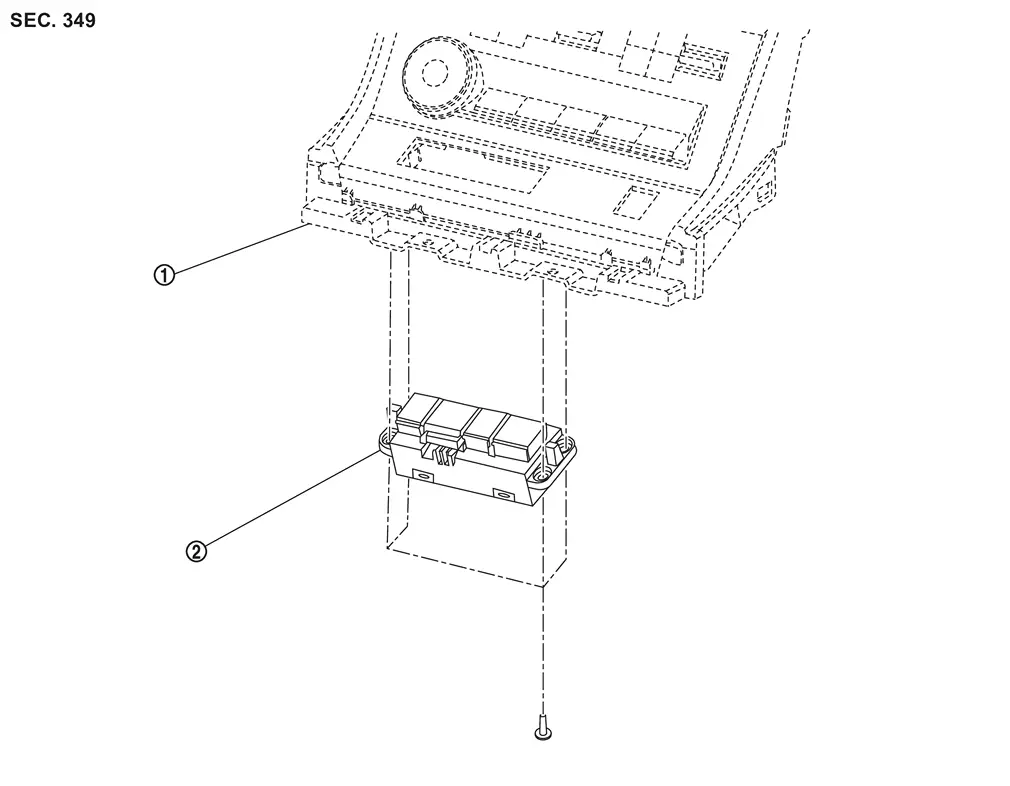
 |
Front center console switch finisher assembly |  |
Electric shift selector |
Removal and Installation
CAUTION:
-
Never disassemble the electronic shift selector.
-
When holding the electronic shift selector, hold the vehicle mounting part.
-
Never allow foreign materials to enter into electronic shift selector.
-
There is connector on the back of electric shift selector, therefore never press down on electric shift selector from above when it is placed on a flat surface.
-
Electric shift selector in the contains a strong magnet, persons with an electro-medical apparatus should keep it away from his/her body. Otherwise it may cause the electro-medical apparatus to malfunction.
-
Keep it away from magnetic objects such as magnetic cards and metal products (e.g. watches).
-
Never subject the electric shift selector to impact by dropping or hitting, water splash or high humidity.
-
Never attach strong magnets such as smartphone magnets to the area
 as shown in the figure.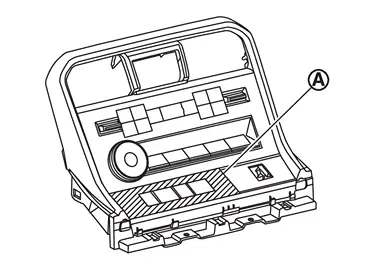
-
When the electric shift selector is dropped or hit, never reuse it.
Removal
Remove front center console switch finisher assembly from center console assembly. Refer to Removal and Installation.
Remove electric shift selector mounting screws and remove electric shift selector from front center console switch finisher assembly.
Installation
Note the following, and install in the reverse order of removal.
CAUTION:
When the electric shift selector is replaced, perform "ADDITIONAL SERVICE WHEN REPLACING ELECTRIC SHIFT SELECTOR" Refer to Description.
-
When installing the electric shift selector to the front center console switch finisher assembly, perform the following procedure.
-
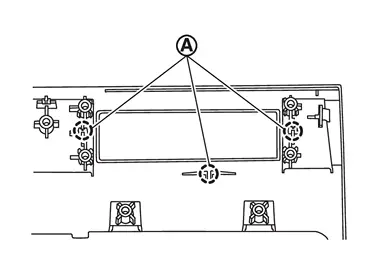
Push the electric shift selector until it engages to the front center console switch finisher assembly locator pin
.
-
Tighten the electric shift selector mounting screws in the order as shown in the figure.
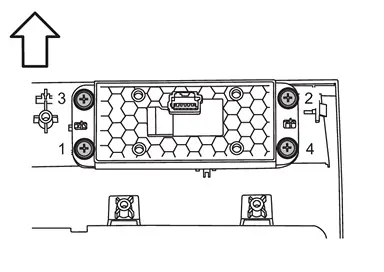
: vehicle front CAUTION:
Check that the front center console switch finisher assembly ribs
,  and
and  and the electric shift selector surface
  are parallel before tightening the mounting screws.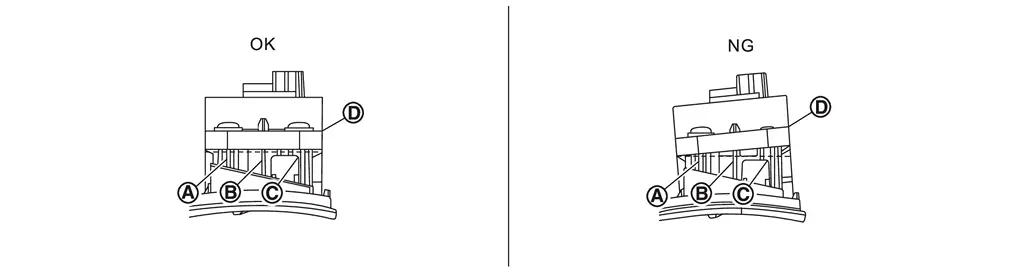
-
Connect electric shift sensor harness connector.
-
-
Perform inspection after installation. Refer to Inspection.
Inspection
Inspection after Installation
Shift Button Operation
Check the shift button operation status according to the following procedure. When there is malfunction, repair or replace the electric shift selector.
CAUTION:
Work safely with the wheels chocked and the vehicle stopped.
-
Check that each shift button is smoothly operated without any twisting, catching, noise, or others by pressing each one.
-
Check that each shift button returns to the original position after pressing each one without catching.
SHIFT POSITION
Check the shift operation status in READY state according to the following procedure. When there is malfunction, perform inspection for the electric shift system.
CAUTION:
Work safely with the wheels chocked and the vehicle stopped.
-
Check that the shift position changes to the position corresponding to the shift button, when pressing each shift button while the brake pedal is depressed.
-
Check that the shift position does not change from P position, even if each shift button is pressed without depressing the brake pedal while the shift position is P.
-
Check that the back-up lamp lights up when the shift position is set to R.
-
Check that the shift position changes to M, when pressing D/M button while the shift position is D.
-
Check that the shift position changes to D, when pressing D/M button while the shift position is M.
Other materials
Doors
Basic information
WARNING
In the Nissan Armada, always keep the doors securely locked while driving.
Combined with proper seat belt use, this significantly enhances passenger safety
by reducing the risk of ejection during an accident and preventing unauthorized
access from outside.
B ...
Rear Door Check Link
Removal and Installation
REMOVALFully close rear door glass.
Remove rear door woofer. Refer to Removal & Installation.
Remove rear door check link mounting bolt of vehicle body side.
Remove rear door check link mounting bolts of rear door panel, and then take rear door check link out from the ho ...
Around View Monitor
Symptom Table
AROUND VIEW MONITOR SYSTEM Symptoms Check items Probable malfunction location
Screen is not switched to camera image, when camera switch is pressed and when shift position is shifted to the reverse position.
“AROUND VIEW MONITOR� is not displayed on the system selection scree ...