
Nissan Armada 2025-2026 Owner's Manual: How to park with predictive course lines
WARNING
- If non-standard tire sizes are installed on the Nissan Armada, the predictive course lines may not display accurately.
- On slippery or snow-covered roads, the Nissan Armada predicted path may differ from the actual vehicle movement.
- If the Nissan Armada battery is disconnected or discharged, the system
may require recalibration.
- Turn the steering wheel fully from lock to lock with the engine running.
- Drive the Nissan Armada straight for at least 5 minutes.
- Turning the steering wheel while stationary may temporarily distort the Nissan Armada predictive lines.
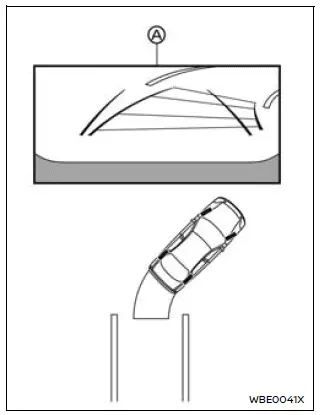
1. Carefully check that the parking area is safe before maneuvering the Nissan Armada.
2. Shift into R (Reverse) to display the rear view on screen A.
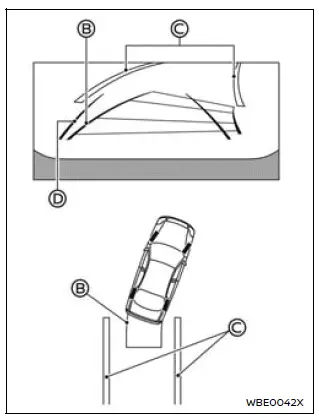
3. Slowly reverse the Nissan Armada while steering so that the predictive course lines B align with the parking space C.
4. Adjust the steering wheel until the vehicle width guide lines D become parallel with the parking space.
5. Once the Nissan Armada is properly positioned, shift into P (Park) and apply the parking brake.
RearView Monitor settings
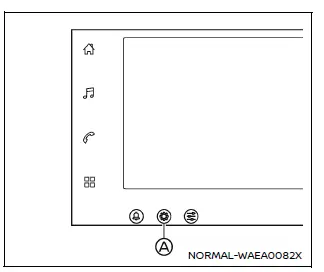
1. Select the "
 "
icon on the Nissan Armada display.
"
icon on the Nissan Armada display.
2. Tap the "
 "
button A.
"
button A.
3. Choose "Vehicle".
4. Select "Camera".
Available setting items:
- Predictive course line
Enable or disable the Nissan Armada predictive guidelines as desired. - Display setting
Adjust brightness, contrast, tint, color, and black level to optimize the Nissan Armada display according to lighting conditions.
The Nissan Armada RearView Monitor system combines advanced visual guidance with intuitive controls, providing drivers with enhanced confidence and precision when reversing or parking.
 Difference between predictive and actual distances
Basic information
The Nissan Armada RearView Monitor provides reference guidelines only. The actual
distance to objects may differ depending on terrain and object positioning.
On uneven surfaces s ...
 RearView Monitor system limitations
WARNING
The Nissan Armada RearView Monitor has certain operational limitations that
must always be taken into account. Ignoring these limitations or relying solely
on the system without proper vi ...
Other materials:
Brake system
Braking precautions
The brake system in the Nissan Armada is engineered with dual independent hydraulic
circuits to enhance safety. This design ensures that even if one circuit fails,
braking capability is still maintained on two wheels, allowing the driver to retain
a level of control in eme ...
General maintenance
Basic information
During everyday operation of your Nissan Armada, it is essential to carry out
general maintenance tasks on a consistent basis as outlined in this section. Regular
attention helps preserve performance, safety, and long-term durability. If you notice
any unusual sounds, vibrat ...
Flat towing your vehicle
Flat towing
Flat towing—also referred to as dinghy towing or “4-down� towing—means towing
your Nissan Armada with all four wheels in contact with the ground.
This method is commonly used when a vehicle is towed behind a motorhome or recreational
vehicle. However, it is critical to unde ...

0.0042