Exploded View
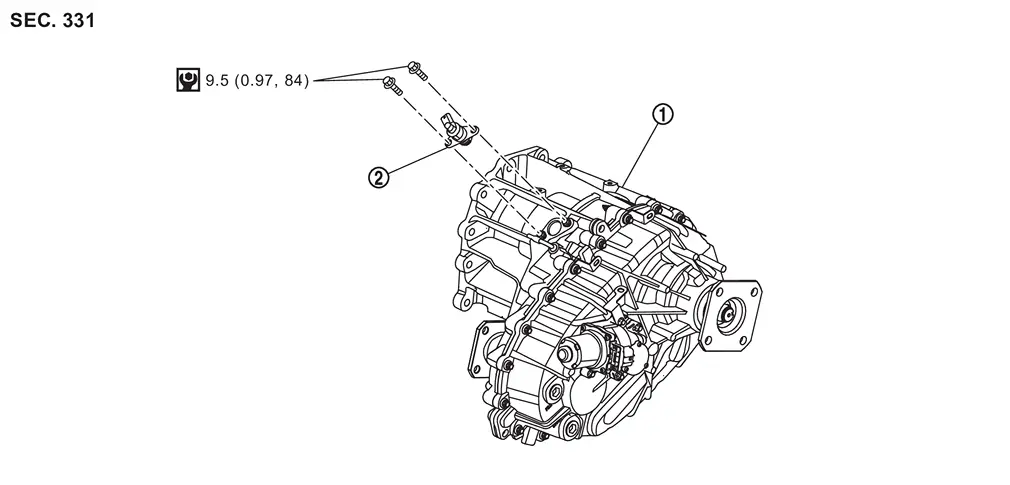
 |
Transfer assembly |  |
Transfer cam position sensor | ||
 |
: N·m (kg-m, in-lb) |
Removal and Installation
WARNING:
-
Jacking up or lift up the vehicle may the vehicle height to go down which cause a personal injury and/or damage to the air suspension component parts. Refer to Precaution for when Jacking and Lifting Up the vehicle with Electronic Air Suspension System.
REMOVAL
Ignition switch OFF.
CAUTION:
Wait for 60 seconds after the ignition switch OFF.
Disconnect negative battery terminal. Refer to Removal and Installation.
Disconnect the transfer cam position sensor connector.
Remove the transfer cam position sensor.
INSTALLATION
Note the following, and install in the reverse order of removal.
CAUTION:
-
Never damage the O-ring of position sensor.
-
Never contaminate or damage the O-ring mounting surface.
Inspection
INSPECTION AFTER INSTALLATION
Check fluid leakage and the fluid level. Refer to Inspection.
ADJUSTMENT AFTER INSTALLATION
When replacing transfer cam position sensor, performe writing unit parameter. Refer to Description.
Other materials
Basic information
CAMERA/
button
WARNING
Improper use of the Nissan Armada Intelligent Around View Monitor system
may result in serious injury or even fatal accidents. Always follow all safety
instructions carefully.
The Nissan Armada Intelligent Around View Monitor is intended as a driver ...
Tire Pressure Sensor Id Registration
Description
This procedure must be performed.
After replacement of a tire pressure sensor or BCM.
After replacement of tire or road wheel.
NOTE:
ID registration is unnecessary if there are no change in the positions of each wheels (tire pressure sensors) before wheel removal and after wheel inst ...
Luggage Side Lower Finisher
Removal and Installation
CAUTION:
Never damage the body panel.REMOVALCAUTION:
When removing, always use a remover tool that is made of plastic to prevent damage to the parts.Remove luggage rear plate. Refer to Removal and Installation.
Release luggage side lower finisher portion of back door weather ...