Exploded View
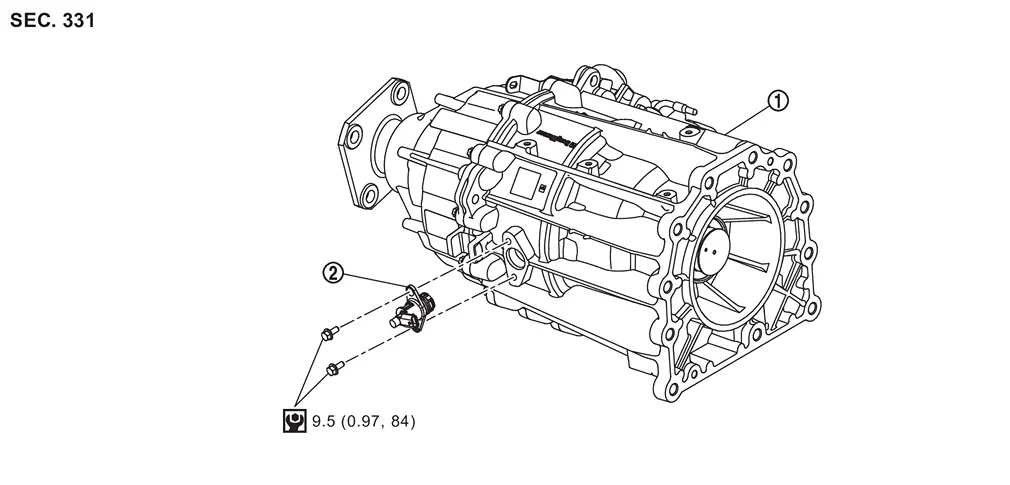
 |
Transfer assembly |  |
Transfer range position sensor | ||
 |
: N·m (kg-m, in-lb) |
Removal and Installation
WARNING:
-
Jacking up or lift up the vehicle may the vehicle height to go down which cause a personal injury and/or damage to the air suspension component parts. Refer to Precaution for when Jacking and Lifting Up the vehicle with Electronic Air Suspension System.
REMOVAL
Ignition switch OFF.
CAUTION:
Wait for 60 seconds after the ignition switch OFF.
Disconnect negative battery terminal. Refer to Removal and Installation.
Disconnect the transfer range position sensor connector.
Remove the transfer range position sensor.
INSTALLATION
Note the following, and install in the reverse order of removal.
CAUTION:
-
Never damage the O-ring of position sensor.
-
Never contaminate or damage the O-ring mounting surface.
Inspection
INSPECTION AFTER INSTALLATION
Check fluid leakage and the fluid level. Refer to Inspection.
ADJUSTMENT AFTER INSTALLATION
When replacing transfer range position sensor, performe writing unit parameter. Refer to Description.
Other materials
Front Seat Belt Buckle
Removal and Installation
REMOVALRemove front seat. Refer to Removal and Installation.
Disconnect seat belt buckle harness connector and disengage harness clip.
Remove seat belt buckle mounting anchor bolt, and then remove seat belt buckle.INSTALLATIONInstall in the reverse order of removal.
Inspecti ...
Tilt & Telescopic
Diagnosis Procedure
CHECK STEERING COLUMN CONTROL MODULE POWER SUPPLY AND GROUND CIRCUIT
Check steering column control module power supply and ground circuit. Refer to Diagnosis Procedure.
Is the inspection result normal?
YES>>
GO TO 2.
NO>>
Repair or replace the malfunctioning parts.
...
Driver Monitor Camera
Exploded View
Driver monitor camera
Steering column cover upper
Removal and Installation
REMOVALRemove the steering column cover upper. Refer to Removal and Installation.
Disconnect the driver monitor camera connector.
Remove the driver monitor camera mounting screws , and remove the drive ...